Gmail mass unsubscribe: get rid of dozens of subscriptions in one go
Gmail doesn't ship with a mass-unsubscribe button. To unsubscribe from many senders at once you have three options: power through them manually using Gmail's search, set up filters that hide them all in one shot, or use a dedicated tool that automates the bulk opt-out. Time and trade-offs for each below.
Try ClearMyInbox free - bulk unsubscribe in one click, free to start.
Option 1: dedicated tool (fastest - 1 to 2 minutes)
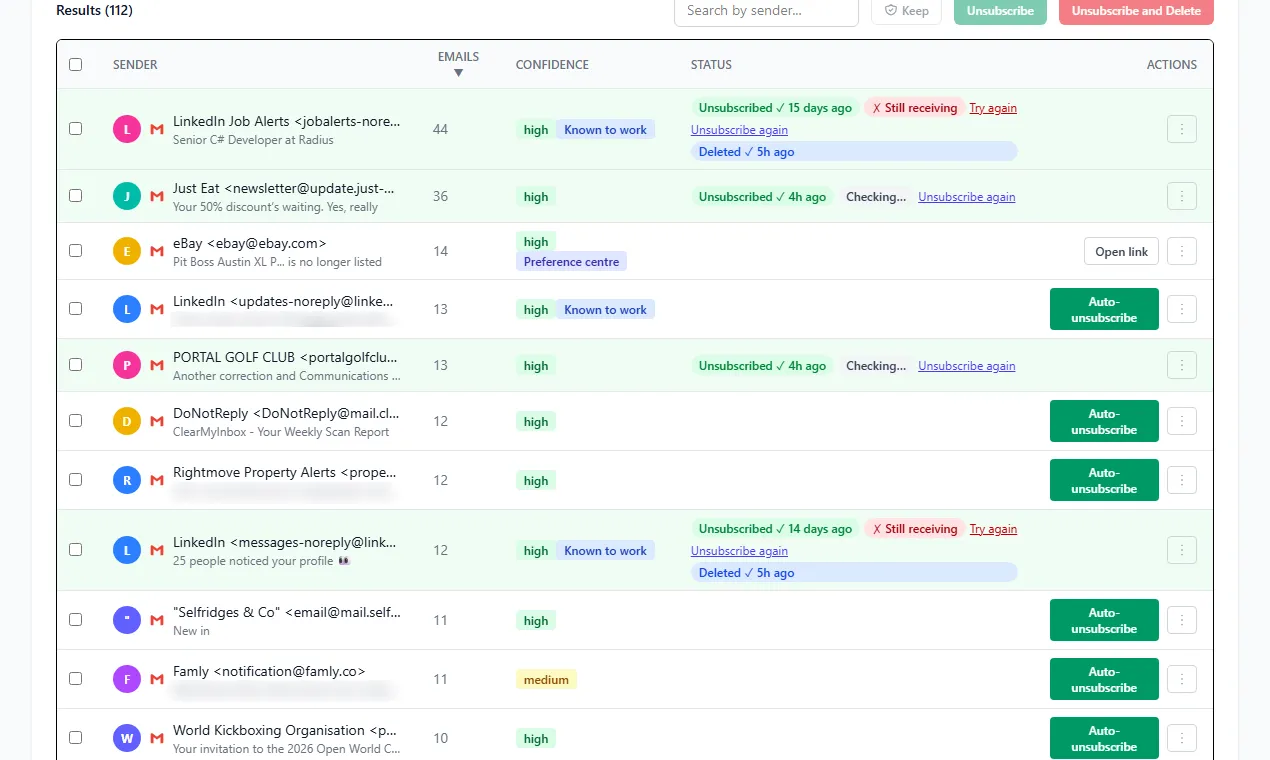
Tools built for this job scan your Gmail, surface every sender that uses the standard List-Unsubscribe header, and let you opt out of dozens at once with a single confirmation. ClearMyInbox is one such tool - it's free to start and uses Gmail's official OAuth so it never sees or stores your password. If you want to compare options first, our roundup of the best bulk unsubscribe apps covers the alternatives.
- Sign up and connect Gmail (read-only access; you can revoke any time from your Google account).
- Run a scan. ClearMyInbox lists every newsletter, promotional, and notification sender in your inbox.
- Tick the ones you want gone. There's a Select All if you want to nuke everything.
- Click Unsubscribe selected. The tool fires off opt-out requests to each sender simultaneously.
The unsubscribes are real - same protocol Gmail's single-click button uses - so senders are obligated to honor them under CAN-SPAM.
Option 2: Gmail filters (medium speed - 5 to 10 minutes)
If you don't want to grant a tool access to your inbox, Gmail's built-in filters can do mass cleanup, just less efficiently. The trick is that filters archive or delete matching messages - they don't actually unsubscribe you. The newsletters still arrive, you just stop seeing them.
- Click the search bar and run
category:promotionsto surface promotional emails. - Click the filter icon in the search bar.
- Choose Skip the Inbox and Delete it on matching messages.
- Tick Apply filter to matching conversations to clean out existing mail.
You can also build filters by sender domain - from:(*@news.example.com) hides every newsletter from that domain. The downside: senders still hit your daily quota, your archive grows forever, and unsubscribing for real (so they stop counting you as an active recipient) doesn't happen. If you just want the existing mail gone, you can also delete all promotional emails in Gmail in about 30 seconds.
Option 3: native Gmail unsubscribe one at a time (slowest)
Gmail's per-email Unsubscribe link is the cleanest method per sender, but tedious in bulk. Roughly 20-30 seconds per sender means 30-60 minutes for 100 senders. Use this only if you have a small number to clear out.
Open each email, click the Unsubscribe link next to the sender's name at the top, confirm in the dialog. Repeat. See how to unsubscribe from emails on Gmail for the full walkthrough.
Comparison: which method should you pick?
- Under 10 subscriptions - native unsubscribe, one at a time.
- 10 to 50 subscriptions, no third-party access - Gmail filters that archive/delete by sender.
- 50+ subscriptions, or you want them actually unsubscribed - a bulk tool like ClearMyInbox.
Whichever method you pick, mass unsubscribing is just one part of a full Gmail inbox clean-up - deleting, archiving, and filters finish the job.
Pitfalls to watch out for
- Filters don't unsubscribe. A filter that archives doesn't tell the sender to stop. They keep counting you as a recipient and hit your quota.
- Don't grant access to a tool you can't audit. Always read the privacy policy. Unroll.me, the most famous bulk-unsubscribe tool, sold anonymized email data for years.
- Some senders use multiple lists. Unsubscribing from "Marketing" doesn't always unsubscribe from "Product Updates" or "Newsletter". Check your preferences page if mail keeps arriving.
Frequently asked questions
Does Gmail have a built-in mass unsubscribe button?▾
No. Gmail's unsubscribe action works one email at a time. To unsubscribe in bulk you either need to combine Gmail's search and filters, or use a dedicated tool that scans your inbox and unsubscribes from many senders in batches.
How long does it take to unsubscribe from 100 newsletters manually?▾
About 30 to 60 minutes - figure 20-30 seconds per sender, plus extra time for senders that take you to a confirmation page. With a bulk tool the same job takes 1-2 minutes.
Are bulk unsubscribe tools safe?▾
It depends on the tool. Some legitimate ones (including ClearMyInbox) only need read access to find subscriptions and use the standard List-Unsubscribe header to opt out, never sharing or selling your data. Others (most notoriously Unroll.me) have historically sold anonymized email data to third parties. Always check the privacy policy before granting access.
Will mass unsubscribing get my account flagged?▾
No. You're using the same RFC 8058 List-Unsubscribe header that Gmail uses for its single-click button. Volume doesn't matter to senders - they just receive standard opt-out requests.
Can I undo a bulk unsubscribe if I change my mind?▾
Once an unsubscribe is sent, it's on the sender to honor it. You can resubscribe via their website, but ClearMyInbox keeps a history of every unsubscribe so you can see exactly which senders you opted out of.