How to unsubscribe from emails on Gmail
To unsubscribe from emails on Gmail: open the email, click the Unsubscribe link next to the sender's name at the top of the message, and confirm. Gmail handles the rest. If the link is missing, the section below covers what to do instead.
Try ClearMyInbox free - bulk unsubscribe in one click, free to start.
Method 1: the built-in unsubscribe button (Gmail web)
For senders that follow the standard email protocol, Gmail shows an Unsubscribe link right at the top of the message - one click and you're done.
- Open Gmail in your browser and click the email you want out of.
- Look at the top of the message, next to the sender's name. You'll see Unsubscribe in blue.
- Click it. A small dialog appears - click Unsubscribe again to confirm.
- Gmail sends the request to the sender automatically. You don't need to do anything else.
Behind the scenes, Gmail uses the List-Unsubscribe header that legitimate senders include in every campaign. That's why one click works - no link-following, no confirmation page on the sender's site.
Method 2: unsubscribe from the email body
If Gmail doesn't show the button at the top (some senders skip the header), scroll to the bottom of the email and look for an unsubscribe link in the footer. Almost every legitimate marketing email has one - the law requires it. Click the link and follow the sender's flow, which is usually a single confirmation page.
Method 3: Gmail mobile app (iOS and Android)
The mobile app shows the same Unsubscribe link, just in a slightly different spot:
- Open the email in the Gmail app.
- Tap the three-dot menu in the top-right of the message.
- Select Block or Unsubscribe if it appears.
- If neither shows, scroll to the email footer and tap the unsubscribe link there.
Method 4: bulk unsubscribe with a tool
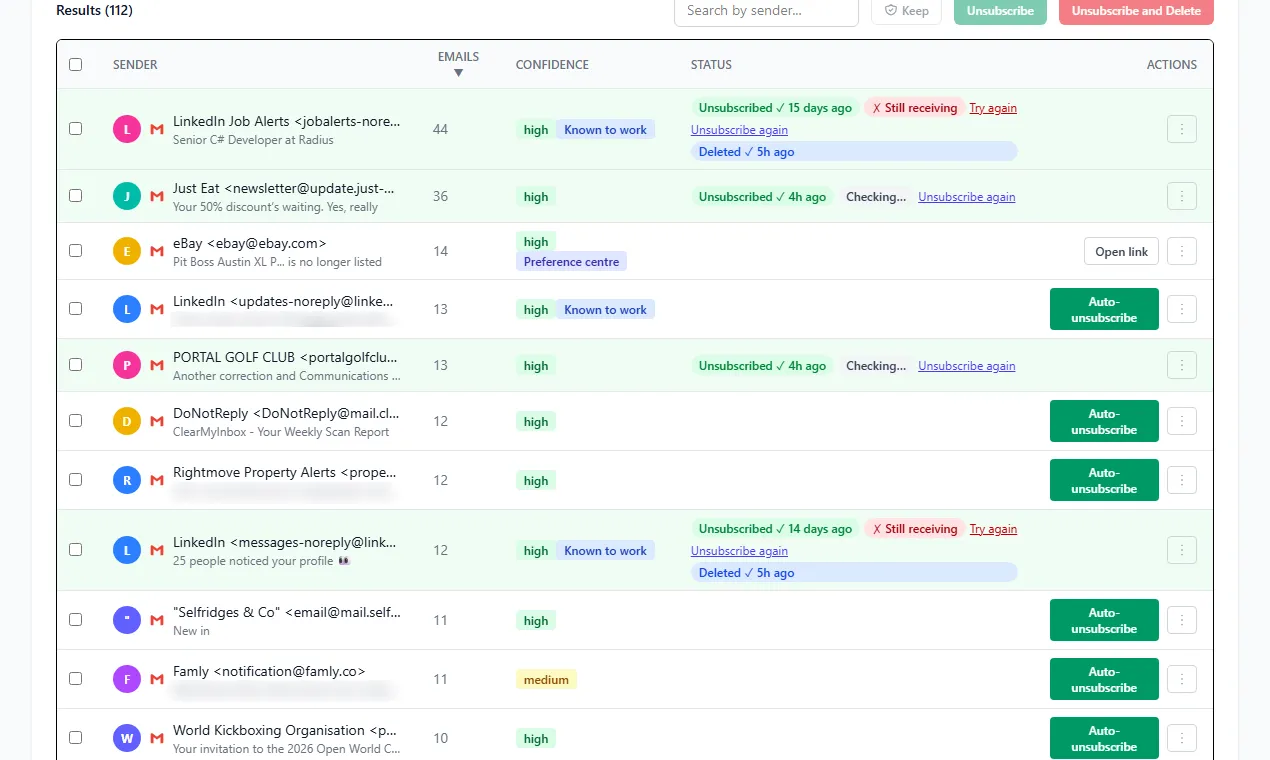
If you have hundreds of subscriptions to clear out, doing them one at a time is painful. ClearMyInbox scans your Gmail, finds every newsletter and promotional sender, and unsubscribes you from selected ones in a batch. The tool works through the same List-Unsubscribe header Gmail uses - so the unsubscribes are real, not just filters that hide the mail. For a comparison of all the bulk approaches, see our Gmail mass unsubscribe guide. Once you've opted out, you can also delete all the promotional emails already sitting in your inbox.
What to do when there's no unsubscribe link
A small minority of senders ignore CAN-SPAM and don't include any unsubscribe link. For those:
- Mark as spam - this trains Gmail's filter and reports the sender to Google.
- Block the sender - any future mail from that address goes straight to Spam.
- Build a filter - in Gmail, click the search box, enter the sender's address, and set the filter to delete or archive matching messages automatically.
What if I unsubscribed but the emails keep coming?
CAN-SPAM (the U.S. law that governs commercial email) gives senders 10 business days to honor an unsubscribe request. If you're still getting emails after that:
- Confirm you actually clicked the unsubscribe link (not just deleted the message).
- Check whether the sender uses multiple email lists - some companies treat marketing, transactional, and product update lists separately. Amazon's emails are the classic example.
- If they keep emailing past the 10-day window, mark every message as spam. That's a stronger signal to Gmail than blocking and over time it impacts the sender's deliverability.
Frequently asked questions
Why doesn't Gmail show an unsubscribe link on every email?▾
Gmail only shows the unsubscribe button when the sender includes the standard List-Unsubscribe header in their email. Most legitimate marketers include it. If you don't see the button, the email may be from a sender ignoring the standard, or it may be misclassified as personal mail.
I unsubscribed but I'm still getting emails. What now?▾
Wait 10 business days - the CAN-SPAM Act gives senders that long to honor the request. If they keep emailing you, mark the message as spam (which is more aggressive than blocking the sender) and report the message in Gmail.
Is it safe to click the unsubscribe link in spam?▾
Mostly no. Real spammers use unsubscribe clicks to confirm your address is active and sell it on. For obvious spam, click "Report spam" instead. For legitimate marketing you simply don't want, the unsubscribe link is safe.
Can I unsubscribe from emails in Gmail without opening them?▾
Yes - hover over a message in the inbox list and click the unsubscribe link in the preview, or use a tool like ClearMyInbox that processes unsubscribes from message headers without opening each email.
How do I unsubscribe from many newsletters at once?▾
Native Gmail doesn't support bulk unsubscribe. Either work through them one by one, build filters that auto-archive unwanted senders, or use a dedicated tool that surfaces every subscription and unsubscribes in batches.