Trimbox review: is it safe, and what does it cost?
Most Trimbox reviews stop at the one-click unsubscribe. The fuller picture: a Chrome extension, web app and phone app whose help centre says it scans sender names and subject lines on your device and keeps none of your email on its servers. Ten unsubscribes are free. The Unlimited price is not on its website, only in its App Store listing.
Try ClearMyInbox free - bulk unsubscribe in one click, free to start.
What does Trimbox do?
Trimbox finds the mailing lists in a mailbox and puts an Unsubscribe button next to each one. Its home page promises you can "unsubscribe from any list with just 1 click. You don't even have to open the email", and that you can "delete all of the past emails from a sender with just 1 click". The help centre describes the workflow as one sender at a time in a streamlined interface: Unsubscribe leaves the list and deletes that sender's existing mail together, and a Keep button deletes the mail without unsubscribing. Its Gmail extension works inside the Gmail tab; the web app and the iOS and Android apps work on their own. The Chrome Web Store listing also advertises an AI email-writing assistant inside Gmail, which is a different product bolted on.
Two limits are in the help centre's own words. "There is no option to delete all emails in your inbox at once"; a mass delete across senders is "on our product roadmap". And the app does not run in the background: "Every time you open the Trimbox app, it starts a fresh scan of your inbox", so you close it mid-way and start again next time. When it unsubscribes you from a list in Gmail, the help centre says it "may create a Gmail filter to automatically manage future emails from that sender", with instructions for finding and removing those filters under Gmail's Filters and Blocked Addresses settings if you want a sender back.
How does Trimbox read your mail, and what does it keep?
The help centre's article "Does Trimbox store or share my email data?" answers "No. Trimbox does not store your email content on our servers. Your email data stays on your device." It says Trimbox reads "email senders and subject lines so it can identify subscription emails", that "this processing happens locally on your device", and that what Trimbox does keep is your email address, your subscription status and payment information handled by its payment provider. The home page puts the same idea as "None of your email data ever leaves your device" and "Never share or sell your email data", and the store listings say personal data is "securely stored on your device only". Access to Gmail is through Google's sign-in, and the help centre points you to myaccount.google.com/permissions to revoke it, adding that the data "is only stored on your computer anyway, so there is nothing to purge on our end".
The privacy policy, last updated 15 April 2026, is written for the whole company, Trimbox LLC of Chicago and its affiliates including Mode Mobile, LLC, and reads more broadly than the help centre. It covers account, subscription, usage, cookie and advertising data, says third-party advertisers "may also use cookies or other technologies to track your use of the Service", and in its sharing section says: "We may sell or share information, including personal information that may be in anonymized, aggregated, or de-identified form, to third parties, who may share that information with entities including analytics companies, investment advisors, asset managers, or others." It also says "We do not sell your Personal Information and only share it with third party service providers to operate our Services." Both sentences are in the same document. Our reading is that the sale clause is about anonymised and aggregated data and the help centre's promise is about your email content, and that a reader deserves to see both before deciding, because the home page's "never share or sell" is doing a lot of work.
How much does Trimbox cost?
The free plan is ten unsubscribes. The help centre says "Trimbox offers a free plan that allows you to unsubscribe from up to 10 mailing lists", after which you need Trimbox Unlimited; the same article's list under "What does Trimbox Unlimited add?" reads "Unlimited unsubscribes" and "Bulk email deletion". What Unlimited costs is the gap in this review, and it is Trimbox's gap, not ours: on 14 November 2026 trimbox.io had no pricing page (its /pricing address returned a 404), its Manage subscription link opens an app page that shows no price on the page we could read, and the terms describe only that subscriptions bill in advance and renew automatically. The one public figure is the App Store listing, which lists ten in-app purchases all called "Unlimited access" at prices from $4.19 to $89.99 with no period stated against any of them. The Google Play listing says only "In-app purchases".
The refund position is better documented than the price. The refund page says "If you aren't satisfied with Trimbox, we'll happy to give you a full refund!" by email within five to seven business days, App Store purchases excepted (those go through Apple). The help centre's free-plan article adds that if you upgraded without realising the free limit existed, it will review your case. The terms, by contrast, say a cancellation earns no refund for the period already paid; the refund page is the more generous of the two and the one support points you to.
Which mailboxes does Trimbox support?
The help centre says Trimbox "connects to your email account (Gmail, Yahoo, etc.)" and the Chrome extension is Gmail only, as its store title "Gmail Unsubscribe Tool by Trimbox" says. The App Store and Play listings add that you can "connect unlimited email accounts". That "etc." is as specific as Trimbox's own pages get about Outlook, iCloud or AOL, so we will not be more specific for it; if you use anything other than Gmail or Yahoo, try the free ten before paying. Platforms are the Chrome extension, a web app at web.trimbox.io, and iPhone and Android apps.
What people ask about Trimbox
Is Trimbox safe?
On the question of your email, Trimbox's design is one of the safest we have reviewed: the help centre says the scan runs on your device and nothing from your mailbox is kept on its servers, and the Chrome Web Store shows a publisher with "a good record with no history of violations". On the question of the company's data practices, read the privacy policy's sharing section above and decide whether anonymised, aggregated data being sold is something you mind. Those are two different questions, and Trimbox's marketing answers only the first.
Can Trimbox be trusted? Is it legit?
It is a real company, Trimbox LLC, with 6,000 App Store ratings averaging 4.7, 60,000 Chrome users, a staffed help centre and a plain refund page. People on Reddit report that unsubscribing from a sender that uses several addresses leaves some mail coming, which Trimbox's own App Store reply to a reviewer also says: "Some senders do use multiple email IDs, which can lead to continued emails despite unsubscribing." That is a limitation of one-click unsubscribing everywhere, not a sign of a scam.
Is Trimbox free?
Ten unsubscribes are. The App Store listing puts it as "free for your first 10; unlimited with subscription". There is no monthly reset mentioned anywhere on its pages, so treat the ten as a one-time allowance.
Is it better to unsubscribe or block a sender?
Unsubscribe first, because only a request reaches the sender; a block in Gmail files their mail in Spam and tells them nothing. Trimbox blurs the two, since the Gmail filter it may create (see above) is a block in all but name. Save blocking for the senders that keep writing after the request, the multiple-address case its App Store reply describes, once you know which ones they are.
How do I delete my Trimbox account?
There is no delete button. The help centre says to email support@trimbox.io with the subject "Account Deletion Request" from the address on the account, giving your full name, the address and confirmation that you want the account and its data deleted; it confirms "within a few business days". Deletion cancels a subscription bought on the website, but the help centre warns it "does not automatically cancel an Apple App Store or Google Play subscription", which you cancel in your phone's subscription settings first. Then revoke Trimbox at myaccount.google.com/permissions.
Where ClearMyInbox differs, and where Trimbox is better
Trimbox is better than ClearMyInbox in three ways. Its processing is on your device, so your sender list never sits on anyone's server; ClearMyInbox makes no such promise, only that it never sells data. It lives inside Gmail as an extension and on your phone as an app, where ClearMyInbox is a website. And it deletes all of a sender's old mail in the same click as the unsubscribe, which ClearMyInbox does not do.
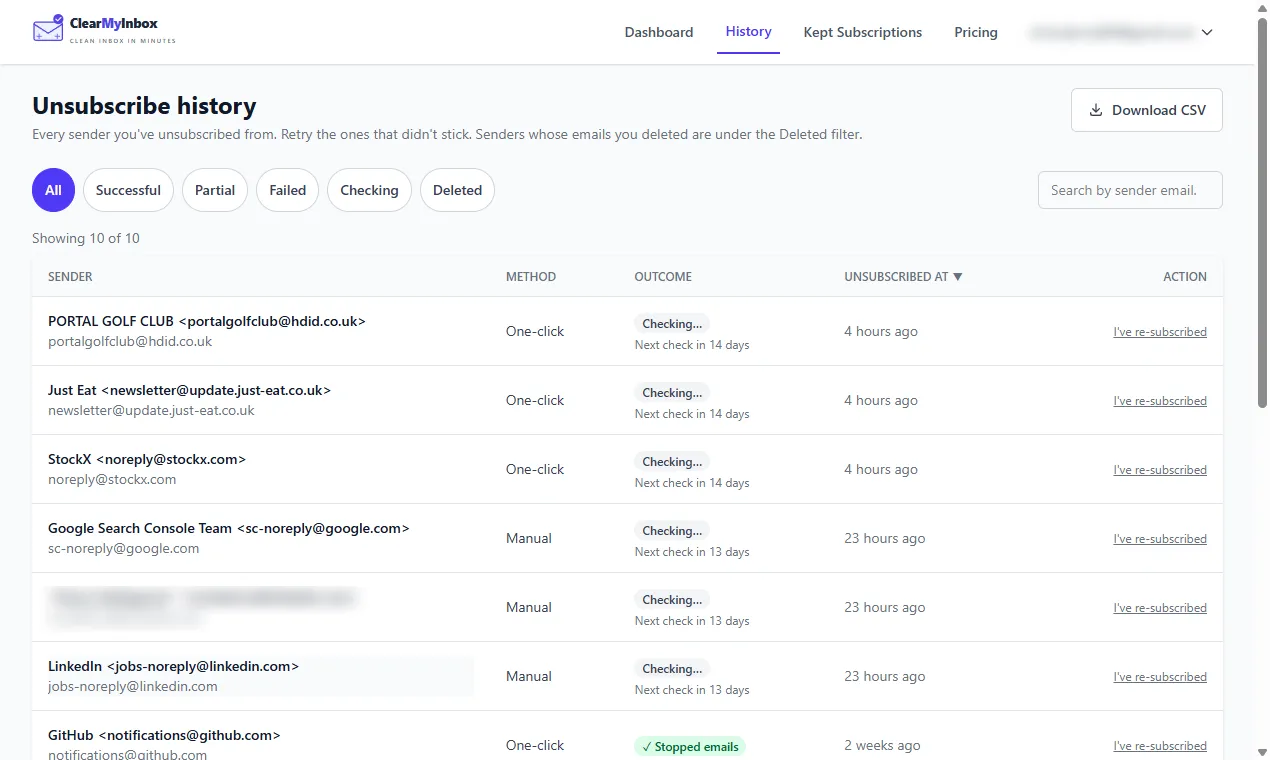
ClearMyInbox differs on what happens after the click. You tick the senders in a Gmail or Outlook mailbox and the requests go out together, not one sender at a time; then each sender is checked again in the weeks that follow, and the history page shows Stopped emails when the mail ended or a flag when it did not. That flag is the answer to the multiple-address problem Trimbox's own reply describes: you find out which senders ignored you and block exactly those. Access is Google or Microsoft sign-in, revoked at any time. And its prices are on its pricing page: ten automatic unsubscribes a month on the Free plan, renewed monthly rather than granted once, and Casual at £29.99 a year. It is funded by those plans, and no data about your email, anonymised or otherwise, is sold.
Our verdict on Trimbox
Our opinion: Trimbox's on-device design is the right way to build a privacy-first unsubscriber, its help centre is honest about its limits, and the refund page is generous. Two things stop us recommending it without caveats: a paid tier whose price you cannot find until you are inside the app, and a privacy policy whose sharing clause sits uneasily next to the home page's promise. If those do not trouble you and you live in Gmail, the free ten are worth trying. For the whole field, see the best email cleaner apps compared and the best bulk unsubscribe apps roundup; our Inbox Zapper review covers the tool most often compared with Trimbox.