The best email cleaner apps compared: what each one cleans, reads and costs
An email cleaner app connects to your mailbox and clears the mail you never read, so you do not have to delete it one message at a time. The best email cleaner app does three jobs: it unsubscribes you from senders you no longer want, deletes the backlog in bulk, and blocks or filters the senders that keep coming back.
Try ClearMyInbox free - bulk unsubscribe in one click, free to start.
Eight email cleaner apps compared
Every cell below comes from the tool's own pages: its pricing page, FAQ, help centre or privacy notice, read on 13 November 2026. Prices are what each page showed to a visitor in the United Kingdom that day; several of these sites price by country, so your figure may differ. Where a site does not state something, the cell says so instead of guessing.
| Tool | What it cleans | Mailboxes | How it reads mail | Price | Data policy |
|---|---|---|---|---|---|
| ClearMyInbox | Unsubscribe, then re-check each sender; block on Casual and Professional | Gmail, Outlook, Yahoo and any IMAP mailbox | Google or Microsoft sign-in; an app password for other mailboxes | Free (10 auto-unsubscribes a month); Casual £29.99 a year; Professional £39.99 a year; Lifetime £129 once | Never sells data; disconnect at any time |
| Clean Email | Unsubscribe, delete in bundles, Screener for new senders, Auto Clean rules | Gmail, Yahoo, AOL, iCloud, Outlook and any IMAP provider | Headers and metadata in its cloud; says it never downloads full emails | £11.99 a month for 1 account to £35.99 for 10; free limited trial | All income from subscriptions; indexed data deleted 45 days after last login |
| Mailstrom | Delete, archive, move, unsubscribe; Block, Chill and Expire for subscribers | Gmail, Yahoo, AOL, iCloud, Outlook.com; Exchange with IMAP on | IMAP, over OAuth2 where offered; stores subject lines and metadata | $9, $14 or $29.95 a month; trial acts on a quarter of 5,000 messages | "We do not use or share your data" |
| Cleanfox | Delete old mail, auto-delete a newsletter's future mail, or keep; no unsubscribe request | Gmail and Microsoft (Outlook, Hotmail) have login steps in its FAQ; some providers not compatible | IMAP with an app password; collects copies of commercial emails | Free, no paid plan | Sells data for e-commerce statistics; you join a NielsenIQ consumer panel |
| Leave Me Alone | Unsubscribe, Rollups, Screener, Spam Blocker; deleting is not mentioned | Gmail, Outlook, iCloud, Yahoo, Fastmail or any IMAP account | Named OAuth scopes on Google and Microsoft; app password for IMAP | 10 unsubscribes free; from £3.00 a month billed yearly; £15 seven-day pass | Paid service; "we don't sell user data" |
| Unroll.me | Block (moves mail to a folder), Rollup digest, Keep; no unsubscribe request described | Gmail, iCloud, Yahoo, AOL, Outlook.com; not available in the EU | IMAP, which must be switched on in the mailbox first | Free (its App Store listing) | Owned by NielsenIQ; shares commercial-email data with clients including data brokers |
| InboxPurge | Unsubscribe, block, delete; newsletters into a digest | Gmail only, desktop only | Chrome extension; processing stays in the browser | Free with 20 credits; $5 for 7 days; $7 a month or $48 a year | Does not store email content on its servers; Google Limited Use |
| Trimbox | Unsubscribe, delete all of one sender's mail; no block, no delete-all | "Gmail, Yahoo, etc." in its help centre; extension, app and website | Reads senders and subject lines locally on your device | 10 unsubscribes free; Unlimited price not stated on its site | Email data stays on the device; policy says anonymised data may be sold or shared |
Email cleaner app vs unsubscribe tool: what is the difference?
An unsubscribe tool does one job: it finds the senders with an unsubscribe link and sends the request. An email clean up tool covers the other two jobs as well, clearing what has already piled up and keeping repeat senders out, and some cleaners skip the request entirely: Cleanfox's FAQ explains that it opted for automatic deletion instead, and Unroll.me's help centre describes Block as moving a sender's future mail to a folder. Both tidy the inbox; neither tells the sender to stop. If you only want the request side, our comparison of unsubscribe apps covers that on its own; this page is about the tools that delete and block too.
Which email cleaner is the best? It depends on the first job you need done
None of the eight does all three jobs equally well, so the honest way to compare them is by what each does first: an unsubscribe-first tool when you want the mail to stop and proof that it did, a delete-first tool when a huge backlog has to go tonight, a suite when you want rules and folders for good.
Unsubscribe first, then check it worked: ClearMyInbox
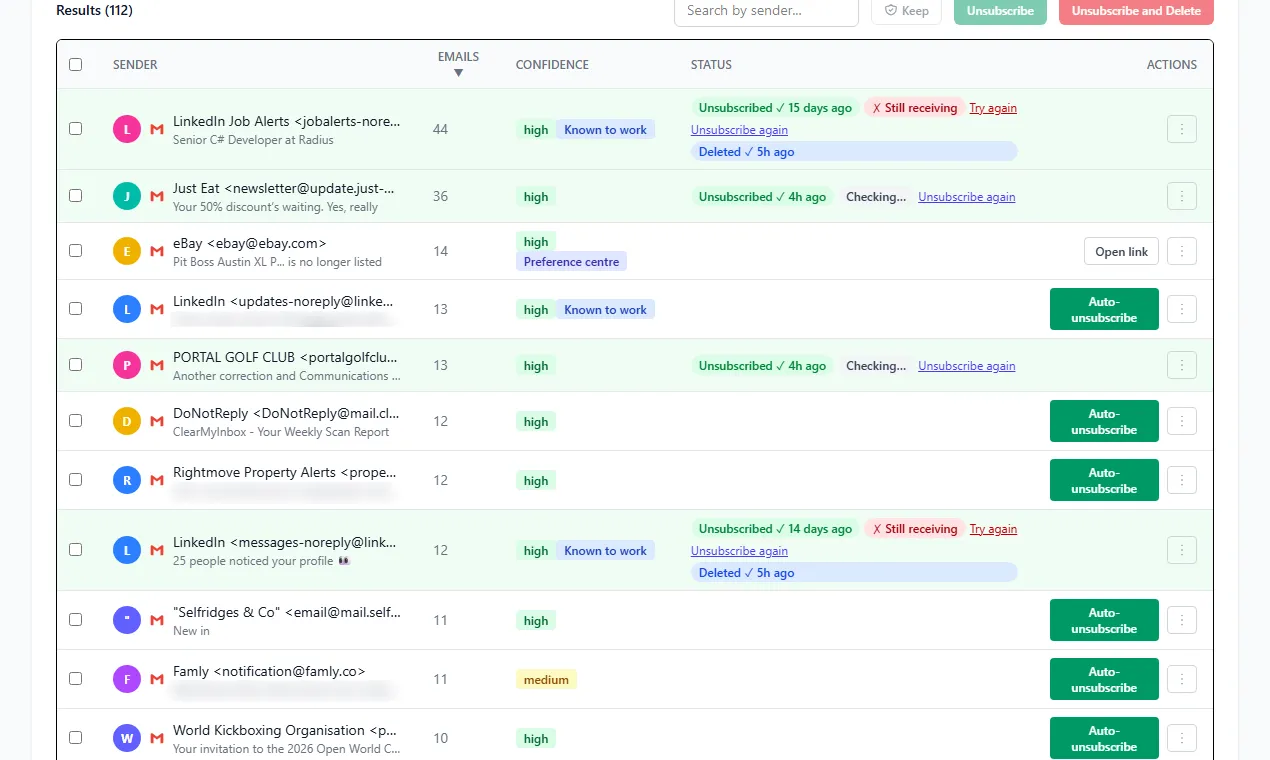
ClearMyInbox scans a Gmail, Outlook, Yahoo or any IMAP mailbox, lists every sender with an unsubscribe link, and unsubscribes from the ones you pick in one go. Then it does the part most cleaners leave out: it re-checks each sender and labels it Confirmed stopped or flags it as still emailing, so the senders that ignored the request are the ones you block. Its pricing page puts that check on every plan, Free included: "We track whether the sender actually stopped, and retry or escalate when they didn't". Blocking, scheduled scans and AI spam scoring arrive with Casual; Professional covers five mailboxes. Gmail and Outlook connect through Google or Microsoft sign-in, other mailboxes through an app password, and you can disconnect at any time.
Unsubscribe first, with a privacy pitch: Leave Me Alone, Trimbox and InboxPurge
Leave Me Alone's pricing page says its Unsubscriber follows "the real unsubscribe link, so you stop getting those emails for good", and its FAQ calls it "a paid service" that does not need to sell data to keep afloat. The first 10 unsubscribes are free with no card; after that it charges per inbox, yearly or monthly, or sells a Seven Day Pass once. Its security page names what each connection grants: gmail.modify on Google, Mail.ReadWrite on Microsoft, an app password elsewhere. Rollups bundle newsletters into one digest and the Spam Blocker moves cold outreach "out of your inbox automatically"; deleting mail is not something its pricing page mentions.
Trimbox runs as a Chrome extension inside Gmail, as a mobile app and as a website. Its help centre says it reads "email senders and subject lines" to spot subscriptions and that "this processing happens locally on your device". One click sends the unsubscribe request without opening the email and a second deletes every past email from that sender; a Keep button deletes without unsubscribing, and a delete-everything option is still on its roadmap. The free plan stops at 10 unsubscribes, after which Trimbox Unlimited adds unlimited unsubscribes and bulk deletion at a price its public pages do not state.
InboxPurge is a Chrome extension for Gmail only, on desktop only. Its home page promises to "unsubscribe, block, and delete thousands of emails" and its FAQ says "your emails never leave your browser"; its privacy policy adds that it accesses "email metadata and content via the Gmail API" but does not store email content on its servers. Basic buys seven days of unlimited access for a one-off $5, Pro is a subscription, one licence covers unlimited Gmail accounts, and refunds run for 14 days.
Delete first: Mailstrom and Cleanfox
Mailstrom describes itself as a way to "unsubscribe and delete thousands of messages in just a few clicks", and its FAQ explains the mechanics: it works over IMAP, with OAuth2 where the provider offers it, downloads metadata and subject lines, and groups related mail into bundles you delete, archive or move as one. Unsubscribe sends a request email or opens the sender's page, while Block, Chill and Expire are reserved for subscribers. Its servers keep only subject lines and metadata, the FAQ says, and the home page states "we do not use or share your data".
Cleanfox is free with "no subscriptions, no trial periods, and no hidden fees", and its FAQ gives the reason: "we sell data for statistical research purposes related to e-commerce". Its privacy notice says it collects "copies of and information from the commercial email messages you receive" and may provide data about them "to customers such as e-commerce businesses, investment companies, consumer brands, media companies, and data brokers"; the home page adds that registering joins NielsenIQ's online consumer panel. The cleaning itself is deletion: for each newsletter you delete the old emails, delete them and auto-delete future ones (the sender's later emails go to the trash), or keep it.
Bundle first: Unroll.me
Unroll.me offers three actions, in its help centre's words: Block "moves emails from a sender to the Unroll.Me/Unsubscribed folder", Rollup compiles the senders you choose "into a daily digest", and Keep leaves mail in the inbox. No page in that help centre describes a request to the sender. Its App Store listing is marked Free, and the help centre explains how: Unroll.me "is owned by NielsenIQ" and shares "information about the commercial emails you receive and some demographic details with clients like e-commerce businesses and data brokers". The FTC's case record shows Unrollme Inc. settled in 2019 over allegations that it "deceived some consumers about how it accesses and uses their personal emails".
Everything, unsubscribe included: Clean Email
Clean Email is the full suite: bundles for removing, archiving, moving or labelling groups of mail, an Unsubscriber that "will send unsubscribe requests on your behalf" and routes that sender's later mail to Trash, a Screener that holds mail from unknown senders, and Auto Clean rules. It runs on the web, iPhone, iPad, Android and Mac. The home page says it "never downloads full emails" and analyses headers only, though the privacy policy says it retrieves a message body when you ask for a full preview, and that indexed data is deleted 45 days after your last login when no subscription is running. Pricing goes by account count after a free limited trial, and the plans page says "100% of our income comes from subscription fees".
Do email cleaners read my emails?
All of them read something, because finding a newsletter means reading at least the sender and the subject line. The spread is in how much, and where: from Trimbox and InboxPurge, which say the processing stays on your device, through Clean Email, Mailstrom and Leave Me Alone, whose servers keep headers or metadata (Leave Me Alone also keeps the content of any sender you put in a Rollup), to Cleanfox and Unroll.me, which collect commercial emails and share data about them with their customers, which is what keeps both free. Whichever you pick, remove a cleaner you stop using from your Google or Microsoft account's connected apps, and delete any app password you made for it.
Is there an AI email cleaner?
Two of the eight say so about themselves. ClearMyInbox's Casual and Professional plans list AI spam scoring among their features, and Leave Me Alone's security page says its Spam Blocker reads content to classify mail and keeps some of it to train its classifiers. Mailstrom takes the opposite position on its home page, calling itself a power tool "unlike artificial intelligence algorithms that try to guess what you think is important". Scoring helps you decide faster; it still does not unsubscribe anyone on its own.
Is a free email cleaner app good enough?
Six of the eight cap what you get before paying:
- ClearMyInbox: 10 auto-unsubscribes a month on Free.
- Leave Me Alone: 10 unsubscribes free, no card.
- Trimbox: 10 unsubscribes on the free plan.
- InboxPurge: 20 credits on the free plan.
- Mailstrom: a trial that acts on a quarter of a 5,000-message snapshot.
- Clean Email: "a free limited trial".
For a dozen senders a cap is plenty. For hundreds, a one-off such as InboxPurge's $5 week or Leave Me Alone's £15 pass costs less than any yearly plan, and the two tools with no cap at all, Cleanfox and Unroll.me, are the two funded by data about your commercial email.
How do I clean up my email for free without an app?
The manual route costs nothing but time: our guides to cleaning up a Gmail inbox, mass unsubscribing in Gmail and cleaning up an Outlook inbox give the clicks. Time is why these apps exist.
How do I get rid of spam emails that keep coming back?
Unsubscribe, then block the senders that ignore it. ClearMyInbox's re-check tells you which those are, Clean Email keeps sending that sender's later mail to Trash, and Trimbox's help centre says a sender still emailing "may mean the sender has multiple mailing lists or is not honoring the request correctly". Where the cleaner has no block, use the mailbox's own: our guides to blocking an address in Gmail and blocking emails on Outlook show where it lives.
Which is the best app to clean up email on Gmail, iPhone or Android?
For Gmail alone, InboxPurge and the Trimbox extension work inside Gmail itself. On a phone, Cleanfox, Unroll.me and Trimbox ship iOS and Android apps, Clean Email has iPhone, iPad and Android apps, and ClearMyInbox runs in the phone's browser with nothing to install.