You never ticked that box. It was ticked for you.
Marketing Box Guard is a free browser extension that unticks pre-checked marketing boxes on signup and checkout forms, before you submit them. Those pre-ticked opt-ins are how you end up on mailing lists you never chose. It clears them automatically, and it never touches the boxes you actually have to agree to.
No account. No paid tier. Nothing leaves your browser.
Chrome, Edge, Brave, Opera and Arc
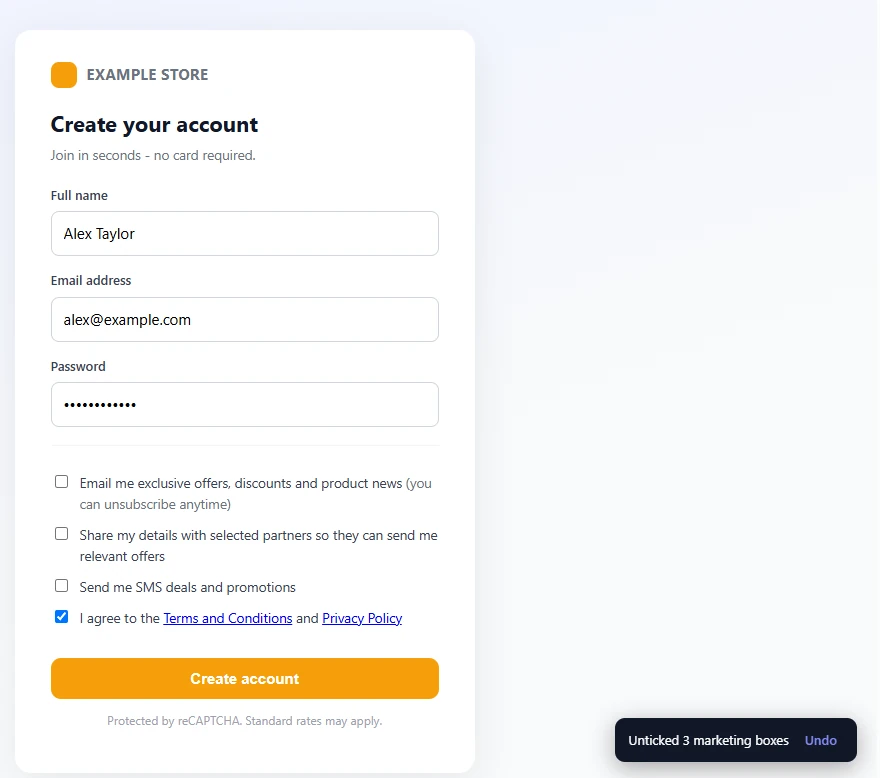
Three marketing boxes cleared, the Terms box left exactly as it was.
460+
brands whose signup and checkout forms we audited
11
caught with a marketing box already ticked for you
2019
the year the EU's top court ruled pre-ticked consent invalid
This is a real signup form
Not a mockup. This is Groupon's US signup, captured during our audit, with the marketing box already ticked on your behalf. Miss it, and you have agreed to "personalized Groupon emails with awesome deals" without ever choosing to.
The same company's UK signup does not do this, because the GDPR does not allow it. That is the whole story in one brand.
Read the full research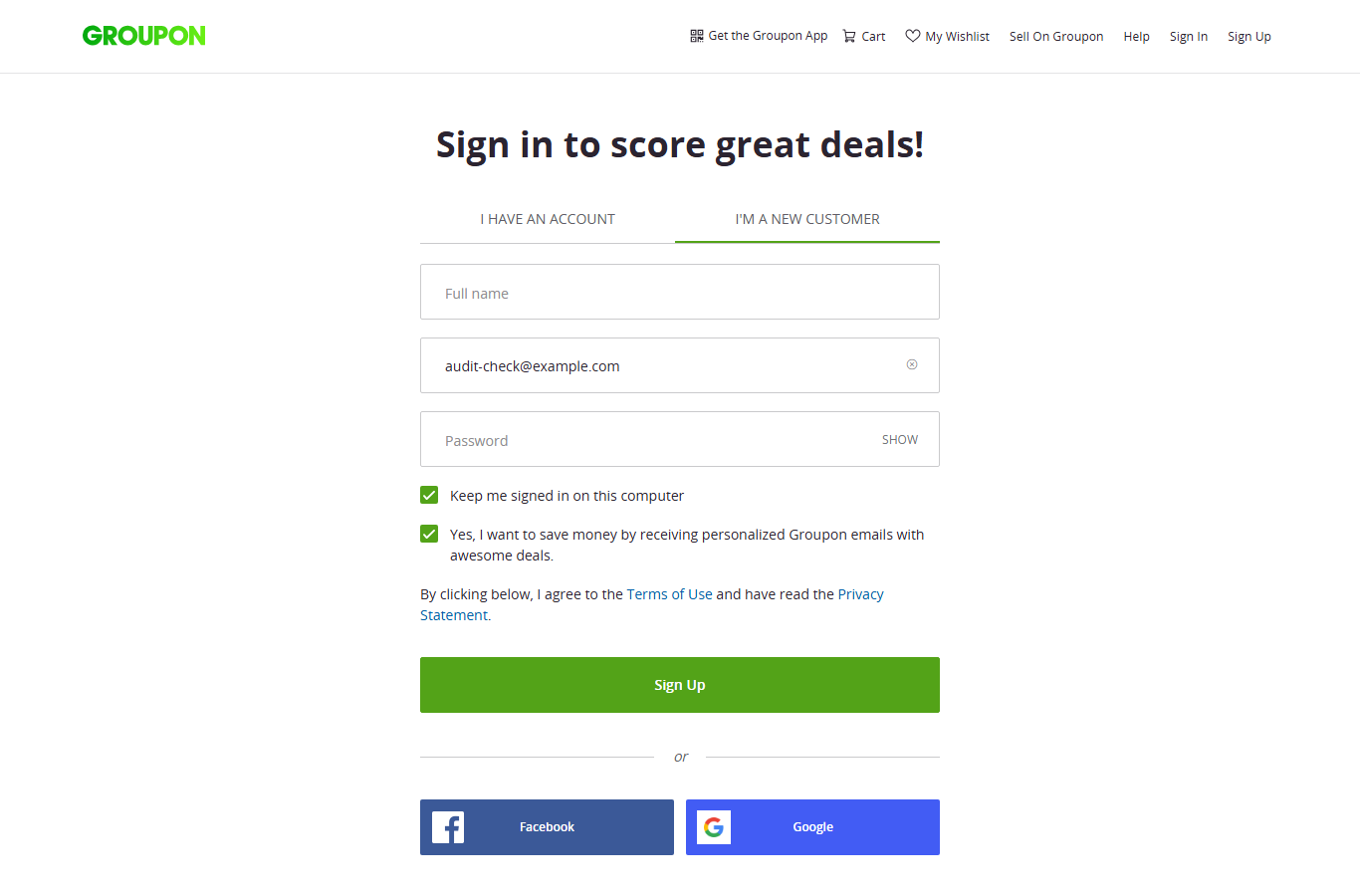
It stops exactly where you would want it to
An extension that unticks boxes for you is only useful if you can trust where it stops. So here is the whole list, both sides of it.
It unticks
- Marketing and promotional email opt-ins
- Newsletter subscriptions
- Partner and third-party sharing boxes
- SMS marketing opt-ins
It never touches
- Terms and conditions boxes
- Age confirmation boxes
- Privacy policy and consent boxes
- Anything you ticked yourself
And if it does act on a box, it says so and offers an Undo. Nothing it changes is invisible to you.
Caught in the act
Three marketing boxes cleared on a single signup form. The Terms box, which you do have to agree to, is left ticked exactly as you found it.
How it works
Step 1
It reads the label, not just the box
Every checkbox on a signup, newsletter or checkout form gets classified by what it actually says. That is how it tells "Email me with news and offers" apart from "I accept the Terms".
Step 2
It clears only the marketing ones
Anything classified as a marketing or newsletter opt-in is unticked before you submit. Forms built with React or Vue often render their boxes late, or only once you start typing, so it keeps watching rather than checking once at page load.
Step 3
It tells you what it changed
Every change is listed with an Undo. You are never guessing what an extension did to a form you are about to submit.
It sends us nothing, by default
The extension runs entirely in your browser. Out of the box it collects nothing, stores nothing off your device, and transmits nothing to us or to anyone else. There is no account and no sign-in.
It has exactly one optional feature, and it is off until you switch it on. If you turn on "Contribute anonymized reports", it sends us the domain name of a site it found showing a pre-checked box, for example example.com. That is all: no page addresses, no form contents, no account, and no identifier that could link a report back to you.
Read the extension privacy policyAlready getting the emails?
This extension is prevention. It stops you joining lists you never chose, but it cannot get you off the ones you are already on. That is what ClearMyInbox is for: it scans Gmail, Outlook, Yahoo or any IMAP inbox, finds every marketing sender, unsubscribes you in bulk, then verifies each one actually stopped.
Frequently asked questions
What does Marketing Box Guard actually do?
It watches signup, newsletter, and checkout forms for marketing opt-in checkboxes that are already ticked when the page loads, and unticks them before you submit. Pre-ticked boxes are how you end up on a mailing list you never chose, because agreeing is the default and you have to notice to opt out.
Will it untick boxes I need to agree to?
No. It only acts on boxes it classifies as marketing or newsletter opt-ins. Terms and conditions, age confirmation, and privacy or consent boxes are left exactly as they are, and so is anything you ticked yourself. Every change it makes is listed with an Undo, so you can put any box back.
Is it free?
Yes, completely, with no account and no paid tier. It is made by ClearMyInbox, whose bulk unsubscribe service is the paid product, but the extension does not require it and works on its own.
Does it send my browsing data anywhere?
Not by default. The extension runs entirely in your browser and transmits nothing. It has one optional feature, off until you turn it on, that sends us just the domain name of a site showing a pre-checked box (for example, example.com) so we can report on which sites still do it. No page addresses, no form contents, no account, and no identifier that could link a report to you.
Does it work on modern sites that load forms with JavaScript?
Yes. Many signup forms are built with React or Vue and render their checkboxes after the page has loaded, or only once you have started filling the form in. The extension keeps watching for boxes appearing late rather than checking once at page load, which is what a simple userscript gets wrong.
Which browsers does it support?
Chrome today, and any Chromium-based browser that installs from the Chrome Web Store, which includes Edge, Brave, Opera, and Arc. A native Edge Add-ons listing is planned.
I am already getting marketing emails. Will this stop them?
No, and nothing that works at signup time can. The extension prevents new sign-ups you did not intend; it cannot unsubscribe you from lists you are already on. For that you need to unsubscribe from each sender, which is what ClearMyInbox does in bulk.
Stop agreeing to things you did not choose
Free, no account, and it starts working on the next form you meet.