Clean Email review: is it safe, and what does it cost?
Short Clean Email review: a paid inbox suite that sends unsubscribe requests, trashes mail from senders that ignore them, and runs cleaning rules. Its plans page says all its income is subscription fees, its home page says it reads headers rather than full emails, and on 14 November 2026 one account cost £11.99 a month or £35.99 a year.
Try ClearMyInbox free - bulk unsubscribe in one click, free to start.
What does Clean Email do?
Clean Email connects to a mailbox and analyses it in the cloud, then groups the mail so you can act on thousands of messages at once: remove, archive, move or label a whole group. Around that core it has four named tools. The Unsubscriber lists every mailing list it finds and, in the help centre's words, "takes every step we can find to unsubscribe you, such as sending an email message to the sender, following the unsubscribe links found in message headers, and automating completion of unsubscribe forms". Because some senders carry on anyway, it also "catches messages from unsubscribed mailing lists and moves them to the trash", and offers Pause, Read Later and deliver-to-folder for lists you want to keep but not see.
The Screener holds mail from addresses that have never written to you until you allow or block them. Auto Clean lets you write rules that archive, trash or label mail as it arrives. Sender settings add Block, Mute, Trash After and Keep Newest per sender. It runs on the web and as iPhone, iPad, Android and Mac apps. That breadth is its character: it is a full mailbox-management product, not a single-purpose unsubscriber, which is both the reason to buy it and the reason some people find it more than they wanted.
How does Clean Email read your mail, and what does it keep?
The home page is specific: "Clean Email never downloads full emails. Our algorithms only analyze email headers that contain subject line, sender and recipient information, dates, email size, and similar metadata. Email body and attachments are not downloaded. Data only stored for 45 days." The privacy policy fills in the edges. It says Clean Email accesses metadata "including sender and recipient details, subjects, dates, folders, labels, and message-preview excerpts", and that "when you request a full-message preview, we also retrieve and process the selected message body so it can be displayed", with preview content possibly cached for a time. So the headline claim holds for the automatic scan, and a body is fetched only when you ask to read one.
On retention: "All the data indexed for your email is automatically deleted from our servers 45 days after your last login to the service as long as there is no active subscription running." On money and data: the plans page says "100% of our income comes from subscription fees", and the privacy policy says it will "never sell or rent your email address or ANY personally identifiable or even aggregated information to another company". It says "all payments and payment information on our site are handled through FastSpring". Access to Gmail, Yahoo, Outlook, Microsoft 365 and AOL is through the provider's own sign-in (OAuth2), which the home page says you can revoke at any time; iCloud and Fastmail need an app-specific password, and other IMAP accounts take a password and server settings.
One newer clause is worth knowing if you use AI assistants: the policy says that if you connect an assistant through the Model Context Protocol, Clean Email shares mailbox statistics, sender and subscription information, subjects and preview excerpts with that application "within the permissions you grant". That is opt-in and off unless you set it up.
How much does Clean Email cost?
Clean Email prices by the number of mailboxes, with all features on every plan. On 14 November 2026 its plans page showed a visitor in the United Kingdom: one account at £11.99 a month or £35.99 a year; five accounts at £23.99 a month or £59.99 a year; ten accounts at £35.99 a month or £119.99 a year. The help centre says "the prices are the same everywhere" whichever store you buy through. Subscriptions renew automatically, and a cancelled plan stays active to the end of the period you paid for, then drops back to a free account.
The free account is real but small. The help centre says it "lets you clean up to 1,000 email messages at no cost", counting moves, deletions and labels, and that you can earn more by enabling cleanup reminders. Premium features, the Unsubscriber included, need the trial: 14 days of everything plus 25 unsubscribe actions, no card required. After that the Unsubscriber is paid. If you have thirty newsletters to leave, the trial covers most of them; if you have two hundred, you are buying a month.
Which mailboxes does Clean Email support?
The help centre lists Gmail, Google Workspace, Yahoo Mail, Outlook, Hotmail, Microsoft 365, AOL, iCloud Mail, Fastmail "and other email providers that allow standard IMAP/SMTP access". It cannot connect to Proton Mail or Tuta, because neither exposes IMAP to an outside server, and it notes Proton Mail Bridge does not help since it runs on your own computer. Shared mailboxes reached only through delegated permissions are out too. In practice that is the widest provider list of any tool we have reviewed, and the paid-by-account pricing means a household can share a five-account plan.
What people ask about Clean Email
Is Clean Email safe?
By its own account, yes: provider sign-in rather than your password, headers rather than bodies for the scan, deletion 45 days after your last login with no subscription, no sale of data, and a business that says it has been in business 12 years, charging for the product rather than monetising the inbox. The one honest caveat is the word "cloud": your headers and preview excerpts sit on Clean Email's servers while you use it, which is how it can run rules while you are asleep, and which an on-device tool does not need. The policy tells you that; decide whether the convenience is worth it.
Is Clean Email legit?
Yes. The plans page says 12 years in business and 3,700 user reviews averaging 4.5, it has native apps in Apple's and Google's stores, and its privacy policy names its payment processor and its retention period. People on Reddit report two recurring complaints, neither about honesty: the free tier runs out quickly, and the suite has more controls than a one-job tool. Both match what the help centre says.
Does Clean Email actually unsubscribe you?
Yes, by the three routes described above, and then it trashes whatever that list sends afterwards. The side effect is that you may never find out which senders ignored you, because the filtering hides the evidence: the help centre's Unsubscribed tab lists what you left, not whether each list stopped.
How do I cancel Clean Email or delete my account?
From the help centre: open the account menu at the top left, choose Subscription, then "Cancel your subscription", and follow the route for wherever you bought it (its site, the App Store or Google Play). To remove your data, open Preferences, then the Data Removal tab, and click "Delete Account and Data" for each address; the help centre says the data is removed "immediately and permanently", and that you must cancel before you can delete. Then revoke Clean Email in your Google or Microsoft account's connected apps, or delete the app-specific password for iCloud.
Where ClearMyInbox differs, and where Clean Email is better
Clean Email is better than ClearMyInbox at most things that are not unsubscribing. It deletes, archives and labels the backlog in bulk; it has rules, a screener and per-sender automation; it has native apps on four platforms; and it connects to iCloud, Fastmail, AOL and any IMAP mailbox, while the ClearMyInbox guides on this site are written for Gmail and Outlook. If you want one tool to run your whole mailbox, it is the stronger product.
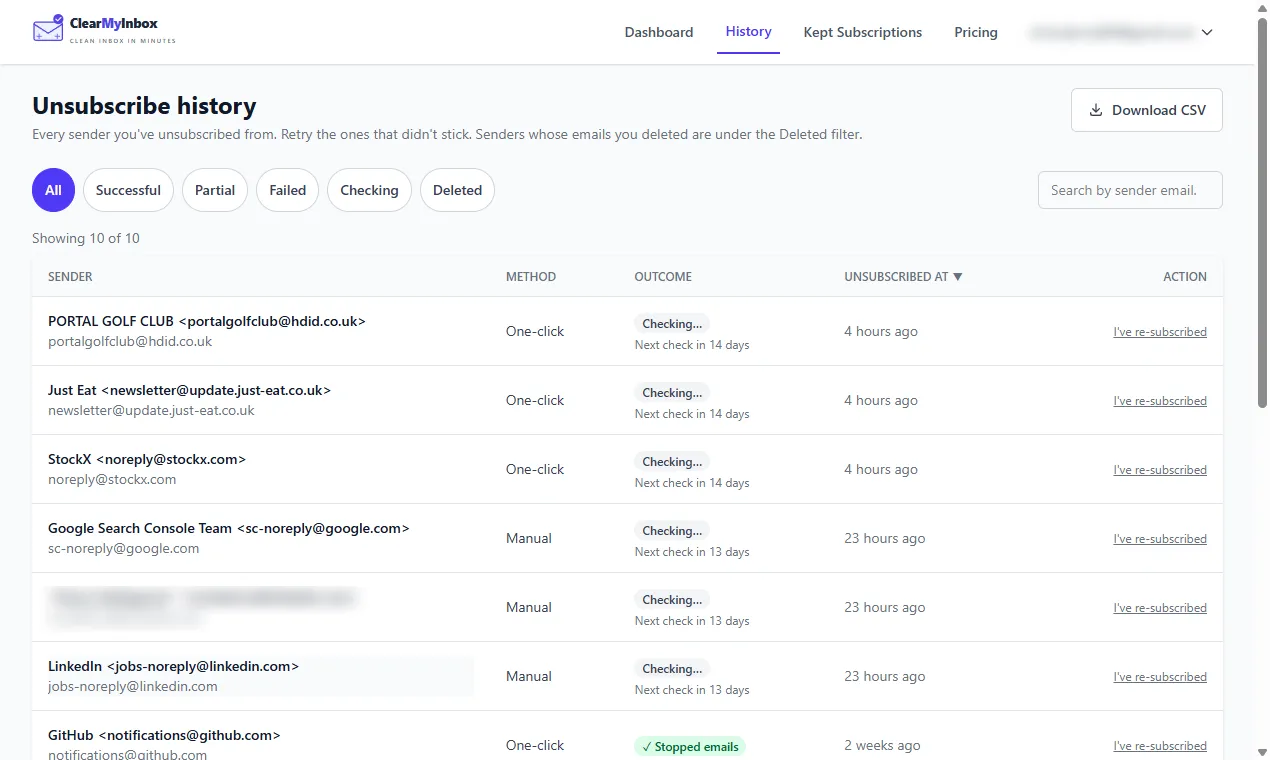
ClearMyInbox is narrower, and for that one job it differs in two ways. The first is what you learn afterwards. Clean Email trashes mail from a list you have left, so a sender that ignored you is hidden rather than reported; ClearMyInbox sends the request for each sender you tick in your Gmail or Outlook mailbox, then watches each one and records the result, Stopped emails when the sender went quiet and a flag when it did not, so the senders worth blocking name themselves. The second is price for a one-off clean: ten automatic unsubscribes come free each month rather than in a 14-day trial, and Casual is £29.99 a year against Clean Email's £35.99 for one account. You connect with your Google or Microsoft account, it never sells data, and you can disconnect it whenever you like.
Our verdict on Clean Email
Our opinion: Clean Email is the most complete paid inbox suite we have reviewed, its privacy statements are specific and consistent with each other, and its price is fair for someone who will use the rules, the screener and the bulk cleaning every week. It is the wrong buy for someone who opened it to leave forty newsletters: the free tier will not cover that, the monthly price is steep for a single afternoon's work, and the trash-on-arrival design means you never see which senders ignored you. For that narrower job our Clean Email alternative page explains the trade, and the best email cleaner apps compared puts Clean Email beside seven others, including Mailstrom, the other paid suite people weigh against it.