Mailstrom review: is it safe, and what does it cost?
A Mailstrom review starts with what it is: a paid tool that groups your inbox into bundles for deleting thousands of messages, and whose home page says "we do not use or share your data". Plans ran from $9 a month on 14 November 2026, prepaid and non-refundable, after a trial limited to a quarter of your newest 5,000 messages.
Try ClearMyInbox free - bulk unsubscribe in one click, free to start.
What does Mailstrom do?
Mailstrom's FAQ calls it "a web-based email client that allows you to take bulk actions on your inboxes". It loads your mailbox over IMAP, groups related mail into bundles, and lets you Delete, Archive or Move a bundle in one click. The home page sets it against the AI cleaners deliberately: "Unlike 'artificial intelligence' algorithms that try to guess what you think is important, Mailstrom is a power tool that amplifies your human intelligence." You decide what goes; it just makes the decision apply to five hundred messages instead of one.
Subscribers get four more buttons. Block removes the selected mail and creates a rule so future matches on sender, list or subject are filtered out of the inbox. Chill removes mail now and returns it on a date you pick. Expire removes a sender's mail once it reaches an age you set. Rules move future mail into a folder automatically. Unsubscribe is there too: in the Mailing Lists tab, the FAQ says, the button will "automatically send an unsubscribe request email to the list owner, or if no unsubscribe address is available, Mailstrom will allow you to unsubscribe on the web in a new tab". So it does send a real request, one list at a time, as a secondary feature beside the deleting that is its reason to exist. Every action can be undone from a task list, because, as the FAQ says, nothing it does is permanent until your provider empties the trash.
How does Mailstrom read your mail, and what does it keep?
The FAQ is candid about access. When you connect, "Mailstrom downloads certain information about your email messages including the subject line and other metadata (sender, date, subject, etc.). Mailstrom also has access to the contents of your emails." On storage: "Mailstrom only stores subject lines and metadata on its servers. Mailstrom has access to the contents of emails, which it uses when you display emails, and may use in other ways consistent with our Privacy Policy." Read those two sentences together: what sits on Mailstrom's servers is the index, but the connection can read bodies, and does when you open one.
The privacy policy, last updated 2 December 2020, says Mailstrom "limits use of user-supplied data to providing or improving features available to you", "does not use any user-supplied data for the purpose of serving ads", and "does not share information with third parties for their direct marketing purposes". Staff cannot view your data without your consent except for security, legal or aggregated internal purposes. It commits to Google's Limited Use rules for Gmail data. After you delete your account it keeps your data "for up to three months to facilitate easy restarting of your account" unless you ask it not to. Credentials are handled the modern way where possible: the home page says "With Gmail, Outlook, and Yahoo we use IMAP via OAuth2, so we never have your password", and for mailboxes that need a plain IMAP password the FAQ says those are stored with 256-bit salted AES encryption.
How much does Mailstrom cost?
On 14 November 2026 Mailstrom's subscribe page listed three plans, each with unlimited email removal and Chill, Expire and Block. Basic is $9 a month or $59.95 a year for one email account with an inbox of up to 10,000 emails and 200 smart filters. Plus is $14 a month or $99.95 a year for three accounts, inboxes up to 250,000 emails and 400 filters. Pro is $29.95 a month or $199.95 a year for 20 accounts, unlimited inbox size and 1,000 filters. Annual billing is labelled as a 40 per cent saving, and group pricing is by email.
Two lines from the terms belong next to those prices. "Paid Mailstrom plans are prepaid and are non-refundable. Mailstrom DOES NOT PROVIDE REFUNDS OR CREDITS FOR ANY PARTIAL MONTHS OR YEARS." Cancelling takes effect immediately, at mailstrom.co/settings, and you keep nothing of the period you paid for. The free trial is the way to avoid regret: the FAQ says it takes a snapshot of your inbox, the newest 5,000 messages if you have more, and lets you delete, archive or move 25 per cent of them with no card. Block, Chill, Expire and rules are not in the trial.
Which mailboxes does Mailstrom support?
Anything with IMAP. The FAQ names Gmail, Outlook.com, Hotmail, Live and MSN, Yahoo, AOL and iCloud, and the sign-up buttons offer Google, Yahoo, Microsoft and AOL directly. A Microsoft Exchange or Microsoft 365 mailbox works only if IMAP is enabled on it, and GoDaddy-hosted mail connects through the Microsoft option. POP-only accounts cannot connect at all; the FAQ's workaround is to pull them into a free Gmail account first. iCloud needs an app-specific password, as Apple requires of every third-party app. Plan size matters more here than with other tools: an inbox over 10,000 messages needs Plus or Pro, because the subscribe page caps Basic at "Up to 10,000 emails".
What people ask about Mailstrom
Is Mailstrom safe?
For a tool that must read your mailbox to work, Mailstrom's account of itself is reassuring: OAuth2 so it never sees your Gmail, Outlook or Yahoo password, only metadata on its servers, no ads, no sharing for marketing, a 2020 privacy policy and a vulnerability-disclosure page linked from the footer. The one line to weigh is that it "has access to the contents of your emails" and "may use" them in ways consistent with the policy. Nothing in the policy suggests anything untoward is done with them, and the policy forbids staff from looking without consent, but it is broader access than a headers-only tool takes.
Is Mailstrom legit?
Yes. It is run by 410 Labs, Inc., has been reviewed in the New York Times, Lifehacker and TechCrunch since 2013 (the home page links the pieces), and publishes terms, a privacy policy, a GDPR page and a refund policy, even if the refund policy is that there are none. People on Reddit report the trial feels tight and the subscription feels expensive for a one-off clean, which matches the numbers above rather than contradicting them.
Is Mailstrom free?
Only the trial. It acts on a quarter of a 5,000-message snapshot with no card, and after that every plan is paid, from $9 a month. There is no ongoing free tier.
How do I cancel Mailstrom or delete my account?
The terms say you can cancel "at any time" at mailstrom.co/settings and that cancellation takes effect immediately, with no refund for the current period. The privacy policy says deleted accounts are kept for up to three months so you can restart, or sooner if you email privacy@mailstrom.com. After that, revoke Mailstrom in your Google, Microsoft or Yahoo account's connected apps, which the FAQ also suggests as a fix for sign-in errors, and delete any app-specific password you made for iCloud.
Where ClearMyInbox differs, and where Mailstrom is better
Mailstrom is better than ClearMyInbox at clearing what has already arrived. It deletes, archives or moves thousands of messages in one action; ClearMyInbox does not clear a backlog. Chill and Expire are genuinely useful ideas with no equivalent on our side. Pro covers twenty mailboxes, and it connects to iCloud, AOL, Yahoo and any IMAP mailbox, where everything this site says about ClearMyInbox concerns a Gmail or Outlook mailbox. If your problem is 40,000 old emails, Mailstrom is the right shape of tool.
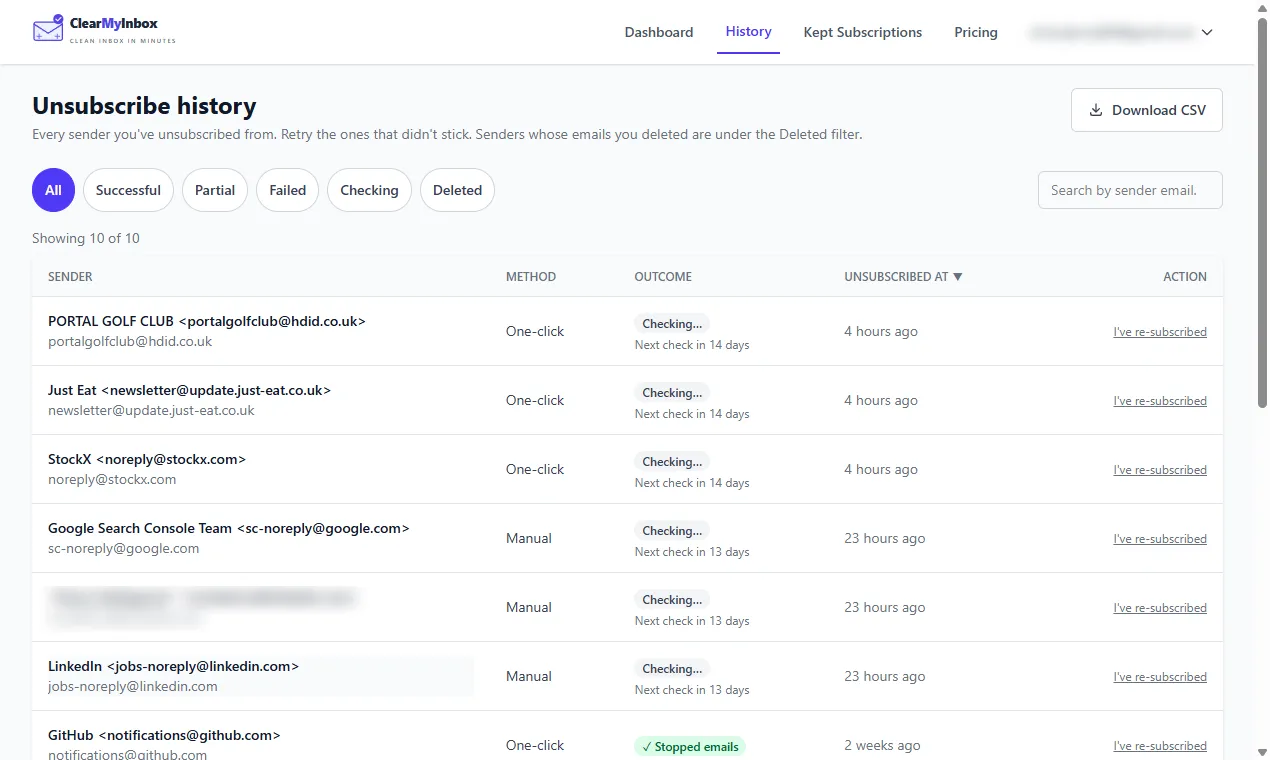
ClearMyInbox is built around the other half of the problem, the mail that has not arrived yet. Pick the senders in your Gmail or Outlook mailbox and it sends every unsubscribe request in one batch, where Mailstrom's button works one list at a time; then it keeps an eye on each sender and writes down what happened, Stopped emails or still sending, which Mailstrom does not attempt. Mailstrom's answer to a sender that keeps going is Block, a filter that hides the mail without ending it. On price the two are not close for the unsubscribe job: ClearMyInbox's free plan includes ten automatic unsubscribes a month with no snapshot cap, and Casual is £29.99 a year against Basic's $59.95. It connects with your Google or Microsoft account, never sells data, and can be disconnected at any time.
Our verdict on Mailstrom
Our opinion: Mailstrom is an honest, well-documented power tool for a one-time excavation, its privacy statements are clear and its OAuth2 connection is the right design, and the no-refund rule means you should spend the trial carefully before paying. It is a weaker buy for the recurring problem, the same forty senders refilling the inbox every week, because deleting them does not stop them and its unsubscribe is a side feature with no follow-up. Our Mailstrom alternative page sets out that trade in detail, our Clean Email review covers the suite most people weigh against it, and the best email cleaner apps comparison lines all eight up together.