Which brands still pre-tick your marketing opt-in?
Pre-checked opt-in boxes are the little marketing checkboxes that are already ticked when a signup or checkout page loads, so you agree to receive emails unless you notice and untick them. To see how common they still are, we checked the signup and checkout forms of more than 460 well-known brands in July 2026. The clearest pattern: UK and European brands almost never pre-tick, because the law does not let them, while a number of US brands still do it by default.
Try ClearMyInbox free - bulk unsubscribe in one click, free to start.
Why a pre-ticked box is a problem
In the UK and EU, a pre-ticked marketing box is not valid consent. The GDPR requires a "clear affirmative action", and the Court of Justice of the EU confirmed in its 2019 Planet49 ruling that a default-on checkbox does not count. That is why almost every UK and EU signup form you meet has its marketing box switched off by default, leaving the choice to you.
The United States has no equivalent opt-in law for marketing email. CAN-SPAM only asks senders to include a working unsubscribe link after they have already started emailing. So in the US, pre-ticking is legal and still fairly common, which is how the same company can treat you differently depending on where you are.
The same brand, two rules: Groupon US vs UK
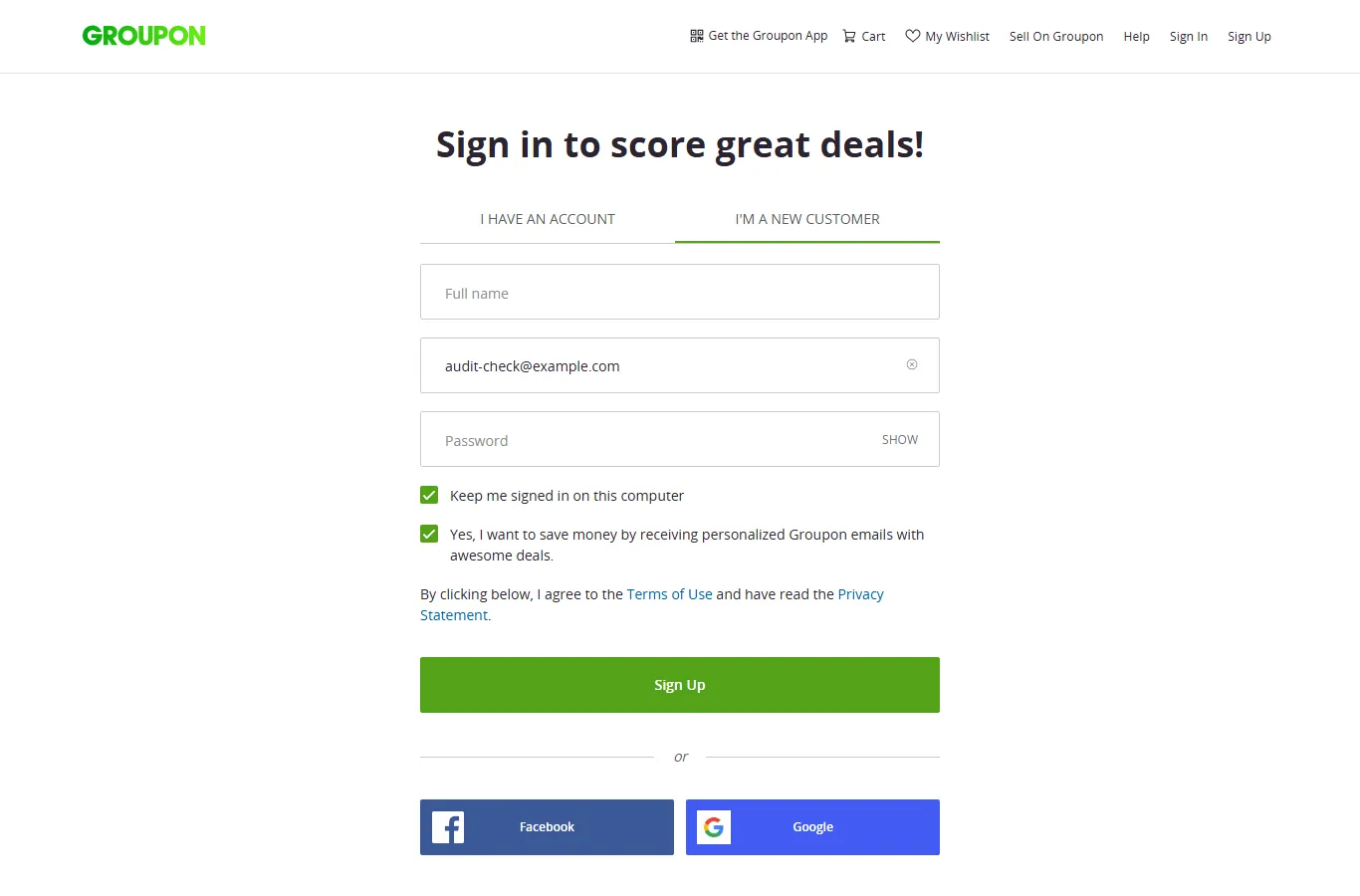
Groupon is the neatest example of the split. On groupon.com, creating an account pre-ticks "Yes, I want to save money by receiving personalized Groupon emails with awesome deals." On groupon.co.uk, the equivalent signup leaves the marketing box unchecked. Same brand, same product, different default, drawn straight along the GDPR line.
Brands we found still pre-ticking (July 2026)
Every entry below was a visible, already-ticked marketing box on the brand's own signup, newsletter, or checkout page when we looked, reviewed by hand from a screenshot. These are point-in-time observations that a brand can change at any time, so treat this as a snapshot, not a permanent label, and check for yourself before you sign up.
| Brand | Where | The box that was already ticked |
|---|---|---|
| Groupon (US) | Account signup | "Yes, I want to save money by receiving personalized Groupon emails with awesome deals." |
| LivingSocial | Account signup | "Yes, I want to save money by receiving personalized LivingSocial emails with awesome deals." |
| Faherty | Account signup | "Yes, I agree to receive marketing emails from Faherty about new arrivals, exclusive offers, rewards, and more." |
| UNTUCKit | Account signup | "Keep me updated on exclusive news and offers from UNTUCKit" |
| Carrd | Account signup | "Send me news and updates." |
| Princess Polly | Account signup | "Email me with updates and offers" |
| Casper | Checkout | "Email me with news and offers" |
| Rare Beauty | Checkout | "Email me with news and offers" |
| Girlfriend Collective | Checkout | "Email me with news and offers" |
| Glow Recipe | Checkout | "Email me with news and offers" |
| Yotpo | Newsletter signup | "Please keep me updated with news and promotions from Yotpo" |
A pattern stands out: the pre-ticking clusters on deals sites (Groupon, LivingSocial), a few software tools (Carrd, Yotpo), and direct-to-consumer online stores, where the box is often buried in the checkout as "Email me with news and offers". The big household retailers we checked, US and UK alike, had almost all moved to unchecked-by-default.
How we checked
We audited 460+ brands with an automated browser that loads each site's homepage, signup pages, and, for shops, the checkout, then runs the same classifier that powers our free Marketing Box Guard extension. It runs in a read-only mode that reads checkbox labels but never changes the page, so a screenshot shows the form exactly as a real visitor would meet it. The tool only flags boxes that are visible, already ticked, and clearly about marketing, and it deliberately ignores required Terms, age, and consent boxes. A person then reviewed each flagged screenshot and kept only genuine pre-ticked marketing opt-ins, discarding hidden or mislabeled boxes. If you run a brand listed here and have corrected it, or think we got one wrong, tell us and we will re-check and update.
How to stop agreeing to emails you did not choose
The manual fix is simple but easy to forget: before you submit any signup or checkout, scan the checkboxes and untick anything about offers, news, deals, or a newsletter that you did not deliberately opt into. Leave the required Terms and age boxes alone.
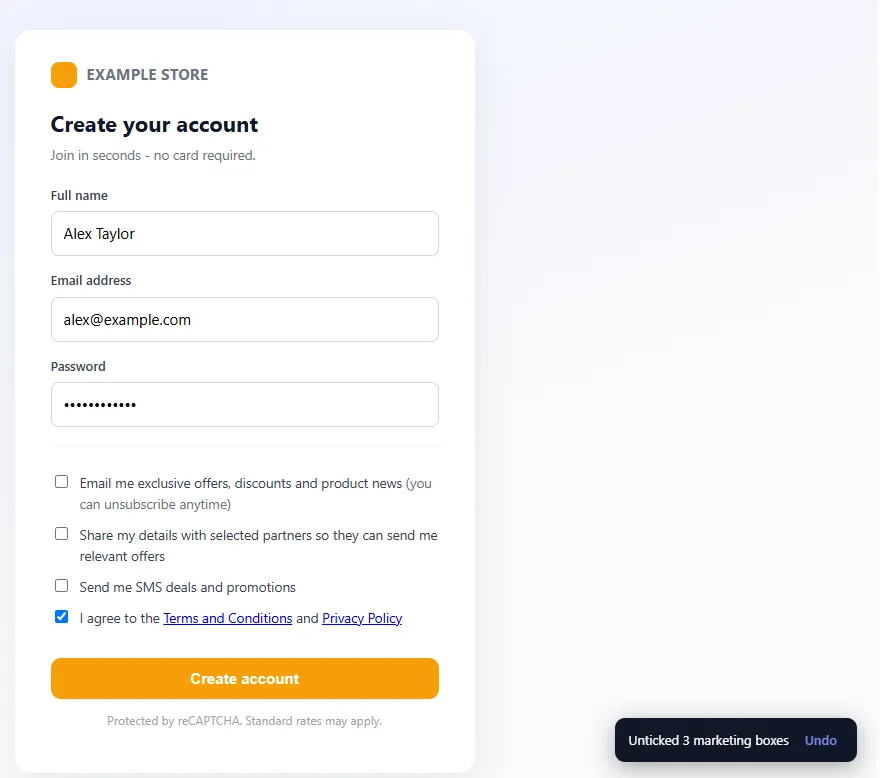
To make that automatic, we built a free browser extension, Marketing Box Guard. It unticks pre-checked marketing and newsletter boxes for you at signup and checkout, and it never touches Terms, age, privacy, or consent boxes. It runs entirely in your browser.
Prevention only helps going forward. If the emails have already started, that is an unsubscribe problem, and it is what ClearMyInbox is for: it scans your inbox, finds every marketing sender, unsubscribes you in bulk, and then verifies each one actually stopped.
Frequently asked questions
Are pre-checked opt-in boxes legal?▾
In the UK and EU, no. A pre-ticked box is not valid consent under the GDPR, which requires a clear affirmative action. The point was settled by the Court of Justice of the EU in the 2019 Planet49 ruling (C-673/17): consent given through a default-on checkbox does not count. In the United States there is no equivalent opt-in consent law for marketing email, so pre-ticking is common and not, in itself, unlawful there.
Why do US sites pre-tick when UK sites do not?▾
It comes down to the law. UK and EU sites face the GDPR, so almost all of them default their marketing box to unchecked. US sites answer to CAN-SPAM, which only requires a working unsubscribe link after the fact, not up-front consent. That gap is why the same company can behave differently by region. Groupon, for example, pre-ticks a marketing box on its US signup but not on its UK one.
How did you find these?▾
We ran an automated audit of 460+ well-known brands using the same detection engine as our free Marketing Box Guard browser extension, in a read-only mode that never changes the page. It flagged every visible, pre-checked box classified as marketing. A person then reviewed each screenshot by hand and kept only genuine pre-ticked marketing opt-ins. The examples on this page were all observed in July 2026 and may change; check for yourself before you sign up.
How do I stop agreeing to marketing I did not want?▾
Before you submit any signup or checkout, glance at the checkboxes and untick anything about "offers", "news", "deals", or a "newsletter" that you did not choose. Leave the required Terms and age boxes alone. Our free Marketing Box Guard extension does this automatically: it unticks pre-checked marketing boxes and never touches Terms, age, or consent boxes.
What if I already signed up and the emails have started?▾
Then it becomes an unsubscribe job rather than a prevention one. You can unsubscribe from each sender individually, or use a bulk tool. ClearMyInbox scans your inbox, finds every marketing sender, and unsubscribes you in bulk, then verifies each one actually stopped.