How to stop spam emails
The answer to how to stop spam emails starts with sorting your unwanted mail into two piles. Spam you never signed up to gets reported and filtered, which trains your mailbox to catch the next one. Marketing you did sign up to gets unsubscribed, which tells the sender to stop. Mixing the two up is what keeps the inbox full.
Try ClearMyInbox free - bulk unsubscribe in one click, free to start.
Is it spam, or marketing you agreed to?
The test is whether you ever gave this sender your address. A shop, a newsletter, an app you installed: that is marketing mail, and its Unsubscribe link is the right tool because it reaches the sender. Google's Gmail help puts that link next to the sender's name, notes that some senders make you finish on their website, and says it may take a few days for the emails to stop; one click may also cover only one of the sender's lists, which is what Gmail's Manage subscriptions view is for.
Mail from a sender you have never heard of is spam, and the one thing not to do is click its unsubscribe link: in real spam that link is a reply confirming a live person reads this address, which makes it worth more to sell on. Apple's iCloud Mail page warns that merely opening junk mail can alert spammers that an active account opened it, so report spam from the message list without opening it. The sender you gave your address to years ago is still marketing: unsubscribe first, block only if the mail continues. Our guides to unsubscribing from emails on Gmail and unsubscribing from emails on Outlook cover the link and what to do when it is missing.
Report and filter spam in each mailbox
Gmail
- On your computer, open Gmail.
- Select one or more emails.
- At the top, click Report spam.
Google says Gmail identifies similar emails more efficiently as you report more, and that it receives a copy of each report. A message impersonating your bank is reported differently: open it, click More next to Reply, then Report phishing. The same menu offers Block "sender" for an address that keeps coming back, after which all their future emails go to Spam. Domain filters are in how to block an email address in Gmail, and how to block spam emails on Gmail covers all three tools in depth.
Outlook and Hotmail
Microsoft's filter moves mail identified as possible junk to the Junk Email folder automatically, where it is deleted for good after a set period; Microsoft's pages give both 14 and 30 days. Microsoft's steps for Outlook on the web and the new Outlook:
- Select the suspicious message.
- On the Home tab, select Report.
- On the drop-down, choose Report Junk, or Report Phishing for a message that impersonates someone.
Microsoft's Outlook.com page adds that when you mark an email message as junk, it is immediately moved to the Junk Email folder. Two more controls on Microsoft's pages:
- To rescue a message the filter got wrong, select it in the Junk Email folder and select Report, then Not junk.
- To block the sender, open Settings, then Mail, then Junk email, enter the address under Blocked senders, select Add, then Save.
Microsoft is explicit that reporting and blocking are separate: a reported sender is not blocked from sending you more, so a persistent one also needs the blocked-senders entry. The junk filter level and Safe senders are in how to stop junk email in Outlook; domains, classic Outlook and the Mac app are in how to block emails on Outlook.
Yahoo Mail
- Go to Yahoo Mail.
- Select the email.
- Click Mark as spam.
Yahoo says this also routes future emails from the same sender to the spam folder, and asks you not to interact with mail once it is there; a mistake is undone with Not spam. Yahoo's blocked-addresses list takes up to 1,000 entries and a domain block needs Yahoo Mail Plus; both are in how to block emails on Yahoo Mail.
Apple Mail and iCloud
- On iPhone or iPad, in the Mail app, swipe left on the message, tap More, then Move to Junk.
- On a Mac, select the message in Mail and click the Junk button in the toolbar.
- On iCloud.com, select the message, click More, then Move Message to Junk.
Those are Apple's steps for an iCloud Mail address; Apple says Junk deletes itself after 30 days. To block a sender in Mail, open the email, tap the contact at the top, tap View Contact Card, then Block this Contact: Apple says that mail then goes to the trash folder, on all your Apple devices. For a Gmail or Outlook account in Mail, use that provider's controls, as how to block emails on iPhone explains.
Stop the supply: keep your address off the lists
The volume only falls when fewer lists hold your address, and each mailbox gives you something other than your real one to hand out:
- Gmail: add a plus sign and any word before the @ sign, such as
name+shop@gmail.com. Google says every variation arrives in your current inbox, and a filter on the To address sorts or deletes what reaches it. - Outlook.com: Microsoft lets you add an alias, another email address that works with the same Microsoft account, from the account's "how you sign in" page; give forms the alias.
- Yahoo Mail: a disposable address in the form
nickname-keyword@yahoo.com, created under Settings, then Mailboxes. Yahoo offers up to 3 free in Yahoo Mail Plus locales and up to 500 with a Mail Plus subscription. - Apple: Hide My Email creates unique, random addresses from the email field in Safari, the From field in Mail, or Settings, your name, iCloud, Hide My Email; it needs an iCloud+ subscription, your own or one in your Family Sharing group.
The form itself is the other leak. A checkout with a marketing box already ticked has signed you up before you read it; our study of which brands still pre-tick marketing opt-in boxes lists who does it and how to stop it. Data brokers are the slow leak: people-search and marketing-data sites gather addresses from public records, breaches and bought lists and resell them, which is why spam reaches an address you have given to nobody new. Most publish an opt-out form under a privacy or "do not sell" link; it is tedious and has to be repeated, but where an alias protects the address from now on, a broker opt-out is what shrinks the lists that already hold it.
How to stop spam emails on your phone
- Gmail app (Android, iPhone or iPad): open the email, tap More at the top right, then Report spam; the same menu in the Spam folder offers Report not spam.
- Outlook app (iOS and Android): select the email, tap the three dots at the top right, select Report Junk, then Junk, Phishing or Block Sender.
- Yahoo Mail app: tap an email, or tap Edit and select several, tap the More icon, then Mark as spam.
- Mail on iPhone: swipe left, More, Move to Junk for an iCloud address; block from the sender's contact card as above.
What ClearMyInbox does with the marketing half
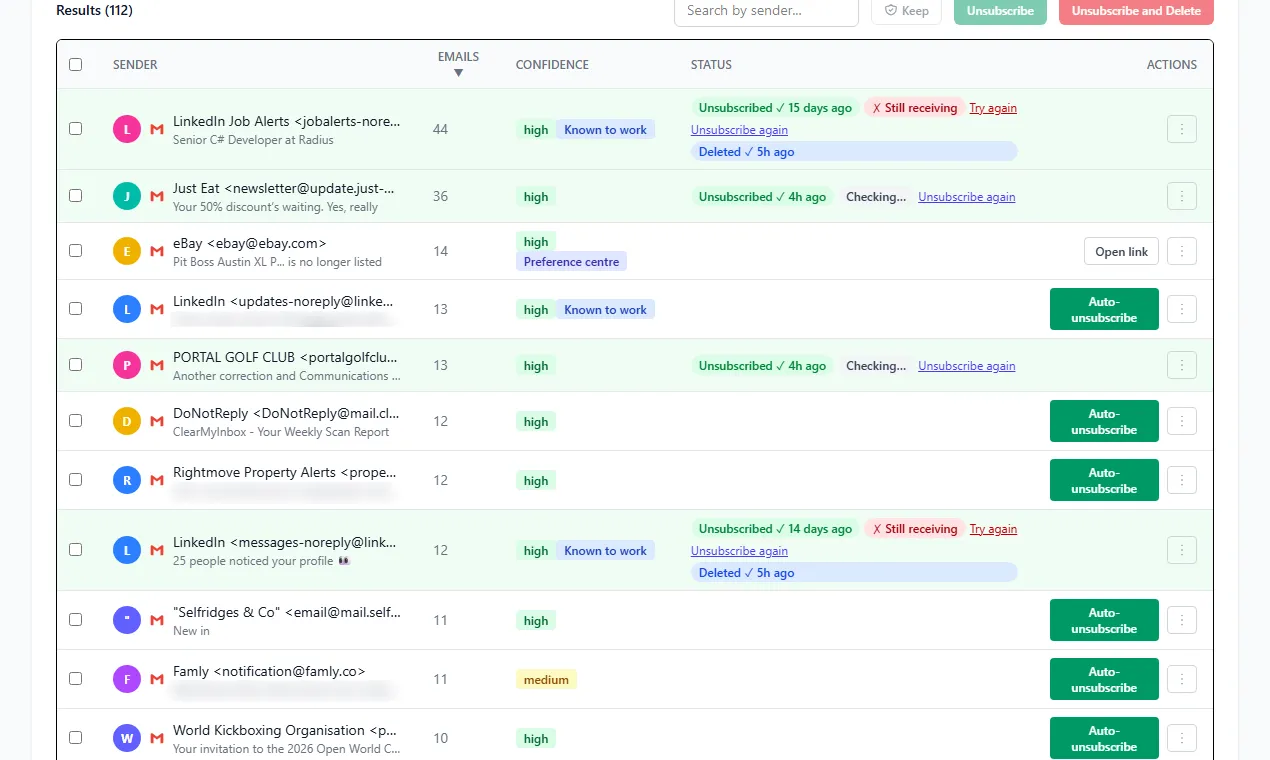
The marketing half, the dozens of senders you did sign up to, is the job ClearMyInbox does. Connect a Gmail or Outlook mailbox with your Google or Microsoft sign-in and it scans for every sender with an unsubscribe link, unsubscribes from the ones you pick in one go, then re-checks each sender and labels it Confirmed stopped or flags it as still emailing. The flagged senders ignored a proper request, so those are the addresses worth blocking. The Free plan includes 10 automatic unsubscribes a month, blocking and AI spam scoring come with Casual and Professional, and you can disconnect the mailbox at any time.
Questions people ask about stopping spam
Is it better to block spam emails or just delete them?
Neither, for true spam: report it. Deleting teaches the filter nothing, and a block matches one exact address, which a spammer uses once; that is also why spam keeps coming after a block, and the new message will show a different address. Reporting feeds the filter that catches the next message from a new address. Block is for a legitimate sender who keeps the same address and ignores an unsubscribe, and a domain filter or block covers one sender with many addresses.
Why am I suddenly getting a lot of spam emails?
A surge usually means your address has just joined a list being sold: a breach at a company you gave it to, a form you filled in, or a click on an earlier spam message that confirmed the address is live. Report each message unopened, and move whichever recent sign-up coincides with the start to an alias.
How do I get rid of spam emails permanently?
No setting ends spam for good, because the sender decides to send and the filter only decides where it lands. What gets close is everything above together: report every spam message, unsubscribe from everything you agreed to, give new forms an alias, and opt out of the brokers that resell the address. An address public for years never reaches zero; one protected from now on falls to a trickle.
Is there a junk email opt out, like the one for junk post?
Not for email. Postal mail has national preference services; email has no central register a sender must check, and most spam comes from senders who would ignore one. The nearest equivalents work per sender: the unsubscribe link for a legitimate marketer, and your mailbox's block list for the ones that ignore it.