Why am I getting emails from Dictionary Scoop?
Dictionary Scoop is a word-of-the-day website at dictionaryscoop.com that emails "a spoonful of knowledge" every day. Its pages name no company, person or address behind it, which is why so many people search for it. It is a working, advertising-supported newsletter, not a scam, and the usual way onto its list is its own sign-up form.
Try ClearMyInbox free - bulk unsubscribe in one click, free to start.
What is Dictionary Scoop, and who runs it?
The site, read on 13 November 2026, offers a Word of the Day, a Wordle-style word game, a crossword, a quiz and a blog. The sign-up box says "Become a language gourmet" and invites you to "Join our community to get a spoonful of knowledge emailed to you daily", with a note that "By signing up you are agreeing to our Privacy Policy and Terms & Conditions". That daily email is what lands in your inbox.
Who sends it is harder to say, and this page will not guess. The footer reads "© 2026, Dictionary Scoop. All rights reserved." The privacy policy refers only to "Dictionary Scoop", the terms to "Dictionary Scoop" and "The Company", and the contact page is a form with no address or email on it. The terms say disputes fall under the "prevailing law of the United States", which is the only hint of a country. The About address returned a server error when we tried it. So: a US-law newsletter with an anonymous publisher. That is unusual for a sender of daily mail, and it is fair to weigh it, but anonymity on its own is not evidence of fraud, and nothing on the site asks you for money or a password.
How did Dictionary Scoop get my email address?
Its privacy policy describes only direct collection: the sign-up form, contacting the site, and a boilerplate clause about accounts, although the site itself has no login. It does not mention buying lists, co-registration, sweepstakes or partner newsletters, so this page cannot tell you it did any of those. The honest reading is that most addresses on the list were typed into the "language gourmet" box, possibly by you after a word game or a quiz, possibly by someone else typing your address by mistake, which happens more with short, common addresses than people expect.
What the policy does disclose is sharing in the other direction. It says the site shares "your email (in hashed form), IP address" with identity partners and service providers, naming LiveRamp Inc., whose identifier may be stored in a cookie and "shared with advertising companies to enable interest-based and targeted advertising". Ad networks on the site "automatically receive your IP address" when their ads load. The purposes listed include "Send you emails" and "for marketing and promotional purposes". A "Do Not Sell My Personal Information" page under the California Consumer Privacy Act lets you tick a box reading "I would like to opt out from having Dictionary Scoop or its third-party vendors sell my personal information to third parties", and the policy links LiveRamp's own opt-out at optout.liveramp.com.
How do I unsubscribe from Dictionary Scoop emails?
The sender's pages do not describe an unsubscribe route at all: the privacy policy has no unsubscribe section, there is no preference page, and the contact page is a bare form. So the route is the unsubscribe link at the bottom of the email, which US commercial email carries by law (the CAN-SPAM Act), with a fallback through the site:
- Open a Dictionary Scoop email and scroll to the footer. Click the unsubscribe link and confirm if a page asks you to.
- In Gmail or Outlook, look for the provider's own Unsubscribe control at the top of the message; for a sender with list-unsubscribe headers it sends the same request without opening the footer.
- If the footer link is missing or dead, use the contact form at dictionaryscoop.com/contact and ask to be removed. The privacy policy says privacy requests go through that form.
- Submit the "Do Not Sell" opt-out at dictionaryscoop.com/consent while you are there. It does not stop email, but it stops the hashed-email sharing with ad partners.
The route is identical on a phone, since there is no app and no account to sign into.
Is it safe to click the unsubscribe link in a Dictionary Scoop email?
Probably, with one more check than usual. Because the publisher is anonymous, you cannot confirm the sender by matching it to a company name. What you can do is match the link to the domain: a real Dictionary Scoop email links back to dictionaryscoop.com, and its footer link should resolve there or to a mailing provider's unsubscribe page. If the link goes anywhere else, do not click it; paste it into our unsubscribe link safety checker, and if it fails, block the sender instead.
What if the emails keep coming?
With no published removal timescale and no named contact, do not spend long waiting. One request through the footer, one through the contact form, then block. Gmail users want our guide to blocking a sender in Gmail, Outlook users the Outlook version, Yahoo users the Yahoo Mail version, and anyone reading on an iPhone the Mail app version. A filter on the whole domain is the better choice here, because a daily sender often rotates the mailbox in its From address.
What ClearMyInbox does with a sender like Dictionary Scoop
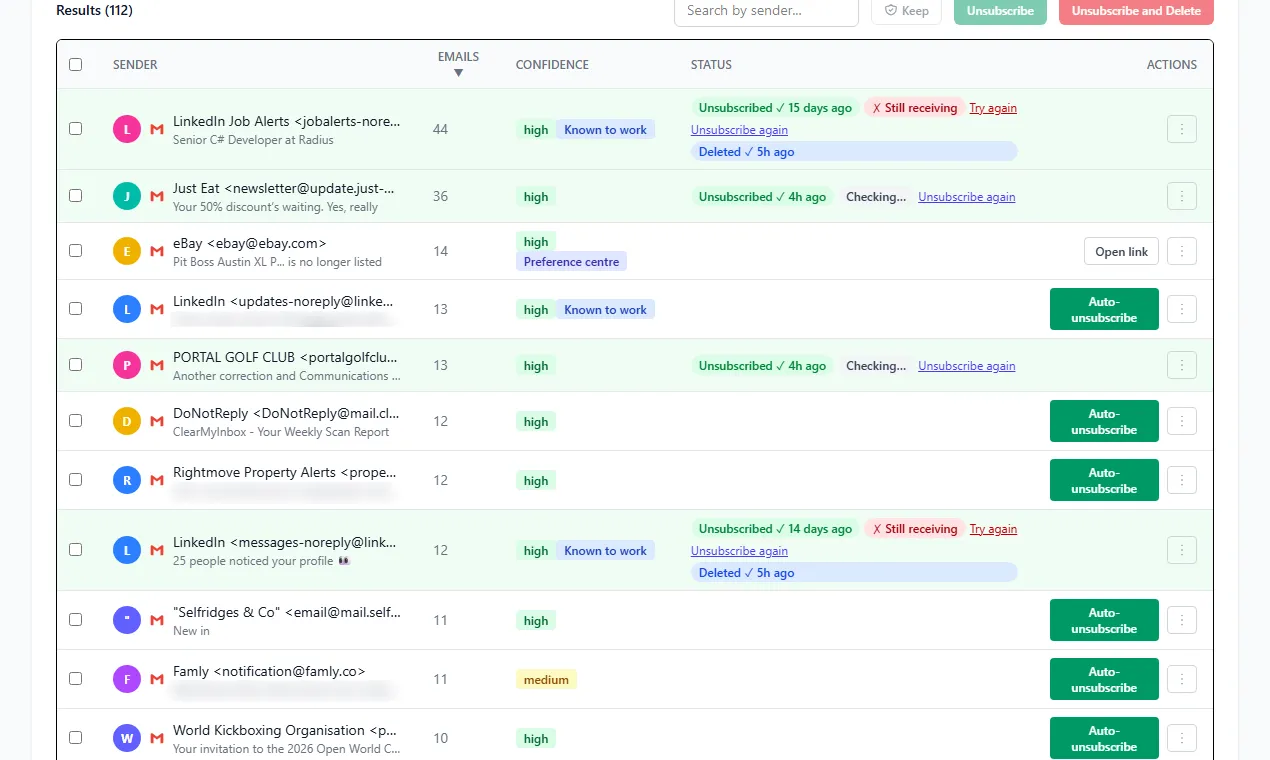
An anonymous daily newsletter is exactly the sender you want checked rather than trusted. ClearMyInbox connects to your Gmail, Outlook, Yahoo or any IMAP mailbox, lists every sender with an unsubscribe link, and sends the requests for the ones you choose in one batch. It then re-checks each sender in the weeks that follow and labels it Confirmed stopped or flags it as still emailing. For a sender that publishes no removal promise, that re-check replaces the waiting and tells you whether blocking is needed.
Frequently asked questions
Is Dictionary Scoop legit?▾
It is a real, functioning site with daily content, a privacy policy and a CCPA opt-out page, and nothing on it asks for payment or credentials. What it lacks is a named publisher. Treat it as a legitimate but opaque newsletter: fine to read, fine to unsubscribe from, not a sender you can look up.
Is Dictionary Scoop spam?▾
If you signed up for the daily word, no. If you did not, you have unwanted mail from a sender whose policy describes only direct sign-up, so the likeliest cause is a mistyped address. Either way, the footer link is the first step and blocking is the second.
Who owns Dictionary Scoop?▾
Its own pages do not say. The copyright line, privacy policy, terms and contact page all use the site name alone, and the terms reference US law without a state. This page reports that gap rather than filling it with a guess.
Why does the privacy policy mention LiveRamp?▾
LiveRamp is an identity partner the site shares a hashed version of your email and your IP address with, so advertisers can recognise you across sites. It is an advertising arrangement, not an email list. Opting out at LiveRamp or on the site's consent page limits the ad tracking; it does not unsubscribe you.