How to stop Free People emails
To stop Free People emails, click the footer unsubscribe link in any Free People email, or sign in and open Account Settings, then Email Preferences. The Mailing List page's link opens Free People's preference centre, which asks for your address and offers two choices: no Free People emails at all, or Free People only with none from FP Movement.
Try ClearMyInbox free - bulk unsubscribe in one click, free to start.
Free People's preference centre, and what it offers
The link in Free People's emails opens a page titled "Update Your Email Preferences" at cloud.s.freepeople.com, which we read on 14 November 2026. It asks you to "Enter your email address below to make changes to your email account", then shows two groups of controls:
- Let's Keep In Touch: one checkbox, "Just Free People emails for me, none from FP Movement!". Tick it to drop the FP Movement stream and keep Free People's.
- Frequency: two options, "I don't want to miss a thing!" and "I no longer want to receive emails from Free People." The second is the full stop; there is no reduced-frequency option between them.
Click Update Preferences, and note the line under the button: "Please allow a few days for this change to take effect." Because the page works from the address you type, it needs no password, which also means a second address Free People writes to needs its own visit.
Unsubscribe from Free People emails from your account
The freepeople.com help centre answers automated reads with a 403, so we read the Wayback Machine's 16 December 2025 capture of its "Free People Mailing List" page. Under Email Subscription it says: "If you wish to unsubscribe from emails, click here or navigate to the Account Settings once logged into your account and select Email Preferences." So the account route is:
- Sign in at freepeople.com.
- Open Account Settings.
- Select Email Preferences and make your choice.
The same page describes how the list fills: "Click on the Sign Up for Email link located at the bottom of any page on our website", with free express delivery on a first order as the incentive. That footer link is the documented way an address joins; whether an address given at checkout is used for marketing is not something the page says.
The privacy policy's third route
Free People's US privacy policy (last updated 9 October 2025, read from the Wayback Machine's 16 December 2025 capture) adds a human route in two places. Its Contact Us section says: "If you don't want us to send you marketing messages anymore, you can contact our DPO or just unsubscribe from the link in one of our messages." The Data Protection Officer's address is DataPrivacyOfficer@urbn.com (URBN is Free People's parent company). And its section on marketing messages says: "If at any time you would like us to update your information or you opt-out, just click here to email FreePeople.com customer service. Please be sure to include your email address, full name and billing address." Use that when the preference centre does not know the address the emails arrive at.
Stop Free People emails on your phone
On a phone the preference centre opens in your browser from the footer link of any Free People email, and the same checkbox and Frequency options are there. The Account Settings route works in a phone browser at freepeople.com. Free People's help page documents the website's Account Settings and no app-only toggle, so that is where to look.
Catalogues and texts are separate lists
- Catalogue: the Mailing List page says "we are only able to mail catalogs within the US, US territories and APO/FPO addresses", that "we do not publish monthly catalogs", and to "allow up to 3 months for your request to take effect". It describes requesting a catalogue, not stopping one; for that, the privacy policy's customer-service email with your email address, full name and billing address is the route it gives for updating your information or opting out.
- Texts: the Mailing List page covers joining ("If you wish to receive text messages from Free People, please click here to subscribe", with a 10% code for first-time subscribers). The SMS terms page that would give the exit could not be read, so this guide gives no text keyword; use the instruction in the text itself.
When Free People emails keep coming
Start with the page's own allowance: "a few days". Then look at which address the new email reached. The preference centre changes the address you typed, so a household with two addresses on the list, or an older address on the account, keeps one stream alive. Visit the preference centre again with the second address, or use Account Settings for the one on the account. An FP Movement email after you ticked the checkbox is the same question: which address did it reach?
If an unsubscribed address is still getting marketing after that, block or filter the sender at your mailbox. We have the provider's own steps for Gmail, Outlook, Yahoo Mail and the iPhone Mail app. Block the promotional address rather than every freepeople.com sender, so the order updates the privacy policy describes still reach you.
What ClearMyInbox does with Free People and the rest
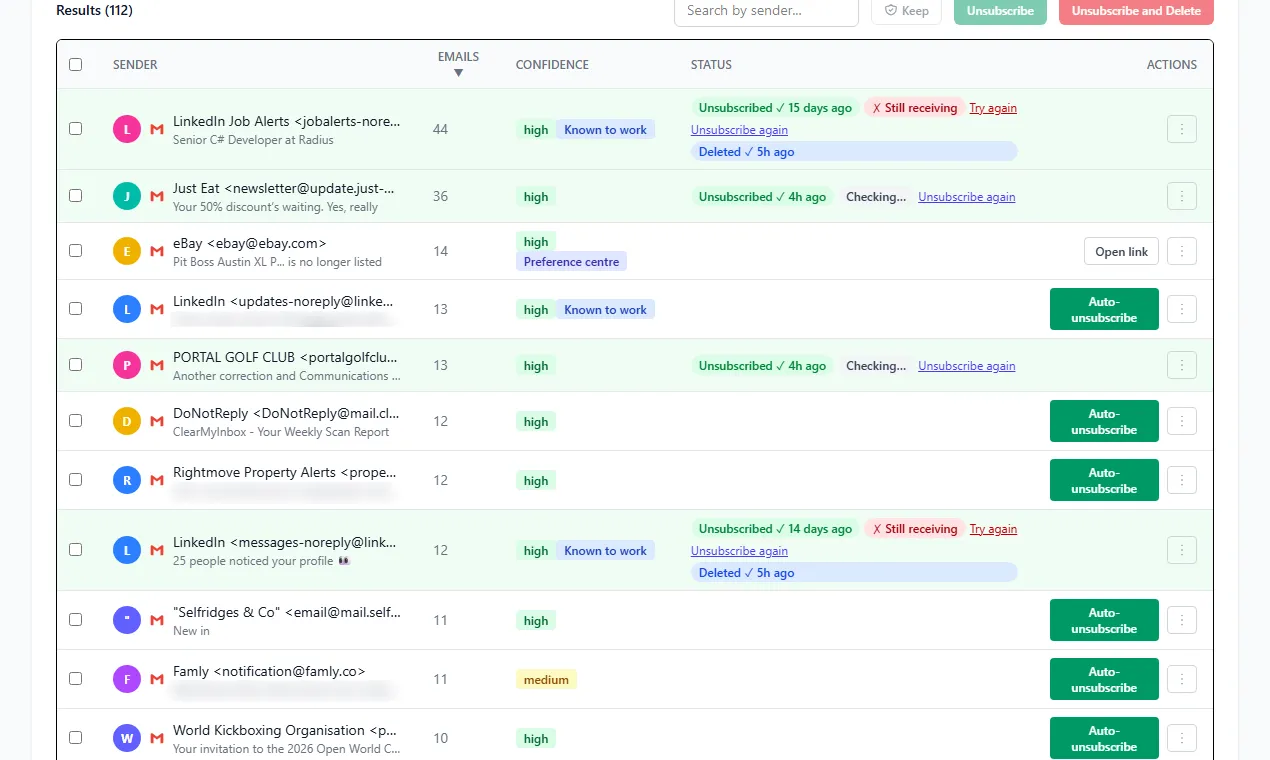
Free People is usually one of a dozen fashion senders in the same inbox, each with its preference page in a different place. ClearMyInbox connects to your Gmail, Outlook, Yahoo or any IMAP mailbox, scans it for every sender with an unsubscribe link, and unsubscribes from the ones you pick in one go. It then re-checks each sender and labels it Confirmed stopped or flags it as still emailing, so a change that took "a few days" shows as confirmed once it has. The Free plan includes 10 automatic unsubscribes a month, and manual ones are unlimited.
Frequently asked questions
Can I get fewer Free People emails instead of none?▾
Not through the preference centre. Its Frequency section has two options and no middle one: "I don't want to miss a thing!" and "I no longer want to receive emails from Free People." The one reduction it offers is the checkbox above them, "Just Free People emails for me, none from FP Movement!", which drops the FP Movement stream and keeps Free People's. For fewer Free People emails while staying on the list, the nearest thing is a mailbox filter that archives the sender.
How do I stop FP Movement emails but keep Free People?▾
On the preference centre page, enter your address, tick "Just Free People emails for me, none from FP Movement!" under Let's Keep In Touch, leave the Frequency option on "I don't want to miss a thing!", and click Update Preferences. The page allows a few days for the change.
Does unsubscribing stop my Free People order emails?▾
Free People's privacy policy says it needs your contact information "to give you updates about your order (for example: to confirm your order, give you delivery information, etc.)" and treats marketing messages as something you choose separately ("You may choose to receive marketing messages from us"). On that description the order updates are not part of the marketing choice.
How do I stop the Free People catalogue?▾
The Mailing List help page covers requesting a catalogue (US, US territories and APO/FPO addresses only, no monthly catalogues, "allow up to 3 months for your request to take effect") and gives no separate stop instruction. The US privacy policy's marketing section says that to update your information or opt out you email FreePeople.com customer service with your email address, full name and billing address, so that is the route to ask for the catalogue to stop.