The inbox zero method: how to get there and stay there
The inbox zero method is the most misunderstood idea in email productivity. It was never about keeping your unread count at zero: when Merlin Mann coined the term, the zero referred to the amount of attention your inbox is allowed to occupy. The method is a way of processing email so that your inbox stops being a to-do list you live inside and becomes a station mail passes through. This guide covers how the method actually works, how to reach zero the first time without losing a weekend to it, and the part most guides skip: how to stay there.
Try ClearMyInbox free - bulk unsubscribe in one click, free to start.
What the inbox zero method actually is
The core of the method is that you touch each message once and make a decision on the spot, instead of reading it, feeling vaguely responsible for it, and leaving it to be re-read later. Every message gets one of five treatments:
- Delete (or archive) - it needs nothing from you.
- Delegate - someone else should handle it, so forward it and archive.
- Respond - if a reply takes under two minutes, send it now.
- Defer - it needs real time, so schedule it and get it out of the inbox.
- Do - it contains a task, so capture the task somewhere you trust, then archive the email.
The discipline is not in any single decision. It is in refusing to leave messages sitting in the inbox as reminders, because a few hundred postponed decisions is exactly the low-grade stress that made you search for this method. If that feeling sounds familiar, our guide to email overwhelm covers why a full inbox is tiring even when you never read it.
Getting to zero the first time
Processing thousands of old messages one at a time is not the method, it is a punishment. Reaching zero from a full inbox is a one-hour job if you do it in the right order:
- Cut the incoming volume first. Most of a full inbox is newsletters and marketing mail, and clearing it without unsubscribing means it all comes back within weeks. Unsubscribe in bulk before you clean, so tomorrow's inbox is smaller than today's.
- Archive the backlog. Archive everything older than a month. Archiving hides mail without deleting it, so anything you archive is still searchable forever. Nothing is lost except the visual clutter.
- Process what is left. What remains after those two steps is usually a few dozen messages. Run the five decisions on each one.
For step one, ClearMyInbox scans your inbox, groups every subscription sender it finds, and unsubscribes you from dozens at once across Gmail and Outlook. It then re-checks each sender and tells you whether they genuinely stopped emailing, which matters because some senders quietly ignore unsubscribe requests, and a broken opt-out will silently refill the inbox you just cleared.

Staying at zero: turn kept messages into work
Here is where most attempts at the inbox zero method quietly die. The delete and archive decisions are easy. The hard messages are the ones you keep because they need something from you: a report to review, an intro to follow up, a decision to make. If those stay in the inbox as their own reminders, you are back to using email as a to-do list, and zero is gone by Thursday.
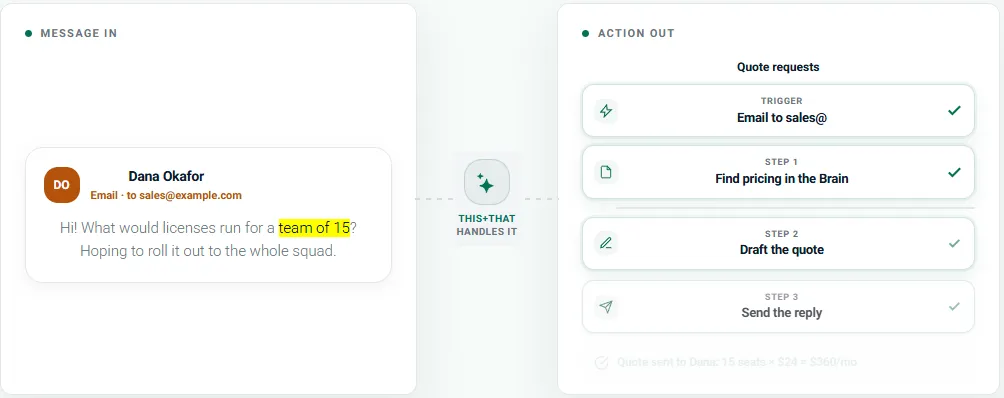
This is a real gap in most email setups, and it is the job this+that exists to do. It reads the messages you keep, across email, Slack, and Teams, and pulls the actual actions out of them into one tracked list. Their tagline is "Messages in. Actions out.", which is precisely the do and defer steps of the method, automated. Instead of an email sitting unread-flagged for a week because it contains a task, the task lands in a system built for tasks, and the email gets archived. It is currently free, and you can sign in with Google or Microsoft, so it slots in next to either mailbox without setup work.
For the defer step on threads that need a reply rather than a task, a snooze tool like Boomerang resurfaces a conversation at the time you choose, so deferring does not mean forgetting. Our roundup of email productivity tools covers the wider stack if you want one tool per job.
Inbox zero on your phone
The method works on mobile, but the jobs split differently. A phone is excellent at triage: the Gmail and Outlook apps both support swipe-to-archive, so a queue at a bus stop is enough to run the delete and archive decisions on the morning's mail. What a phone is bad at is the setup work - bulk unsubscribing, filters, and the first big clear-out are all faster in a browser on desktop. Do the reset at a desk, do the upkeep anywhere.
Is inbox zero worth it?
Honestly: the strict version is not for everyone. If defending an empty inbox becomes its own source of stress, you have swapped one obligation for another. The durable win is the low-volume inbox the method produces as a side effect: few enough messages arriving that nothing important gets buried, whether or not the counter reads zero. Cut the volume, capture the tasks, and return to zero when you sit down to process - that is the whole method, and it takes minutes a day once the flood is off. If your starting point is a Gmail account with years of buildup, our step-by-step Gmail cleanup guide (or the Outlook version) is the practical place to begin.
Frequently asked questions
What is the inbox zero method?▾
Inbox zero is an email workflow created by productivity writer Merlin Mann. The zero refers to the amount of attention your inbox is allowed to occupy, not the unread count. In practice you process each message once and make one of five decisions on the spot: delete it, delegate it, respond if it takes under two minutes, defer it to a scheduled time, or do the task it contains. The inbox becomes a processing station rather than a to-do list.
How long does it take to reach inbox zero?▾
Less than most people expect, because the bulk of a full inbox is subscriptions rather than messages that need a decision. Unsubscribing in bulk and archiving everything older than a month typically takes under an hour, even on an inbox with tens of thousands of messages. The daily upkeep after that is usually 10 to 20 minutes, provided the incoming volume stays low.
Do I have to keep my inbox at zero every day?▾
No, and treating zero as a daily obligation is the main reason people abandon the method. Zero is a reset point you return to every day or two, not a state you defend hour by hour. If a strict zero feels like its own job, aim for a low-volume inbox instead: few enough new messages that nothing important gets buried. That gets you most of the benefit with far less upkeep.
Why does my inbox fill back up after I clear it?▾
Because clearing the inbox does not change what arrives tomorrow. Most cleanups fail here: the subscriptions that filled the inbox are still active, so the flood resumes within weeks. Bulk unsubscribing from the senders you never read is the step that makes inbox zero stick, and it is worth verifying the senders actually stopped, since some ignore unsubscribe requests.
What tools help with the inbox zero method?▾
One per step is enough. ClearMyInbox cuts incoming volume by unsubscribing you from newsletters and marketing senders in bulk across Gmail and Outlook, then verifies each sender actually stopped. this+that turns the messages you keep into tracked tasks so your inbox stops doubling as a to-do list. A snooze tool like Boomerang handles the defer step by resurfacing threads when you can act on them.