Unroll.me review: is it safe, and what does it cost?
Is Unroll.me safe? Its servers do not keep your emails and it costs nothing, but its help centre says it is owned by NielsenIQ, reads your commercial emails and shares information about them with clients including data brokers, and in 2019 it settled FTC allegations that it deceived users about that. The facts are below; the verdict is ours.
Try ClearMyInbox free - bulk unsubscribe in one click, free to start.
What is Unroll.me, and what does it do?
Unroll.me is a free inbox cleaner that scans a mailbox for subscription emails and lists them. Its help centre describes three things you can do with each sender. Block "moves emails from a sender to the Unroll.Me/Unsubscribed folder in your mailbox without showing them in your main inbox". Rollup moves selected senders to an Unroll.Me folder and compiles them "into a daily digest, delivered at your preferred time". Keep leaves them in the inbox. Those are the whole product: a list, a folder, a digest.
One thing the help centre never describes is a request to the sender. The article on blocking spells out the mechanism: block deals@groupon.com and Unroll.me begins "to automatically move all future emails" from that address into the Unroll.Me/Unsubscribed label. The sender still sends. The article on deleting your account confirms it from the other side: once the account is gone, "new emails will start landing in your inbox again". If you expected "unsubscribe" to mean the mail stops at the source, Unroll.me is not that tool, and this is the single biggest thing to know before signing up.
What is Rollup on Unroll.me?
The Rollup is the feature Unroll.me is best known for. You pick the newsletters you want to keep reading, and instead of arriving one at a time they are bundled into a single email once a day, at a morning, afternoon or evening time you choose. The help centre says the senders you roll up "will no longer be sent to your inbox as standalone emails"; the originals sit in the Unroll.Me folder, and the digest shows snapshots you can skim without opening each one. You can add and remove senders over time. For someone with twenty newsletters they genuinely read, it is a tidy format, and none of the tools we compare on this site offers quite the same thing.
How does Unroll.me read your mail, and what does it keep?
This is where the "is it safe" question is really decided, so here is the help centre in its own words. The article "What do we do with your data?" says Unroll.me "is owned by NielsenIQ, an e-commerce measurement and consumer data company", that when you register "we access your commercial emails, using that data to enhance advertising products, measurement products, datasets and other services for our customers", and that "we share information about the commercial emails you receive and some demographic details with clients like e-commerce businesses and data brokers for market analysis". The same article says the company is "not interested in your personal emails" and that its processes are designed for commercial and transactional ones.
On storage, the help centre says "we don't store any of your emails on our servers": the mail stays in your mailbox under Unroll.me's labels, and after you delete the account the labels and the moved mail remain. The access itself is IMAP. The help centre says "the IMAP protocol must be enabled in mailbox settings to use Unroll.Me", and for Gmail it walks through switching on 2-Step Verification and creating an app password, because passkeys are not supported. An app password is a standing credential, so if you ever leave, the help centre's own advice is to remove it from your Google or Apple account afterwards.
There is a way to stay a user without being in the dataset. The help centre documents a Measurement Panel Opt-In switch under Settings on the website and a Manage Data Permissions option in the app; after opting out, it says, collection stops, data already collected stays but is anonymised and flagged, and deleting the account removes it. A Download My Data option, also under Settings, produces an archive within ten days.
What did the FTC say about Unroll.me?
The FTC's case record says Unrollme Inc. settled over allegations that it "deceived some consumers about how it accesses and uses their personal emails", with the Decision and Order dated 17 December 2019. The press release announcing the final order says the company had told consumers it would not "touch" their personal emails while sharing e-receipts with its then parent company, Slice Technologies, and that the order bars Unrollme from misrepresenting how it collects, uses, stores or shares information, requires notice to the affected users, and required it to delete the stored e-receipts unless users gave affirmative, express consent. Whatever the reason, the help centre's data article is now plain about it: what you are consenting to is written down.
How much does Unroll.me cost?
Nothing, and the help centre says why. On 14 November 2026 its "How much does Unroll.Me cost?" article read "We don't charge our users for our service", followed by the explanation that Nielsen Consumer LLC "measures e-commerce through a technology that automatically recognizes commercial emails and extracts purchase information from them". The App Store listing shows Free and lists no in-app purchases; the Google Play listing says "100% Free: Our email cleaner is completely free. No hidden fees, no subscriptions". There is no paid tier to compare, which also means there is no paid tier that would take you out of the panel; the opt-out switch above is the only route.
Which mailboxes does Unroll.me support?
The help centre lists Gmail and Google Apps, iCloud (me.com, mac.com and icloud.com), Yahoo Mail, AOL Mail, and Outlook.com, Hotmail, MSN and Live Mail. It runs on the web and as iOS and Android apps, and for Gmail it recommends the app "because it is easier to connect". Google Apps is on the list with a catch the Gmail article spells out: some Google accounts provided through work, school or other organisations may not allow an app password or 2-Step Verification, and without those the mailbox cannot connect. Microsoft 365 work mailboxes are not named at all. And a UK or EU visitor cannot sign up at all: unroll.me itself redirected us to a page saying the service "is not available for customers in the EU and the European Economic Area".
What people ask about Unroll.me
Is Unroll.me safe to use?
Safe against a hacker, broadly yes: it does not store your emails, it uses an app password you can revoke, and its help centre has a Security section with an article on how to report a security issue. Safe against your inbox being read for market research, no, because that is the product's business model, stated in its own words above. The honest test is whether you would have ticked the box had it been put to you this clearly. Unroll.me now puts it this clearly, so you can decide.
Is Unroll.me legit?
It is a real company with a real owner, over 133,000 App Store ratings, and a help centre that answers the awkward questions in writing. Legit and private are different questions, and people on Reddit report confusing the two: the common story is signing up for the Rollup and finding out about the data sharing later. Read the "What do we do with your data?" article first and the surprise goes away.
What does Block mean in Unroll.me?
Block is Unroll.me's word for filing, not for stopping: the folder move described above, with nothing sent to the sender. The label keeps filling with mail you never see, and because that move is the only thing holding the sender back, deleting your Unroll.me account brings the sender straight back to your inbox. If you want it gone from your mailbox as well as from view, unsubscribe or block it in Gmail or Outlook yourself.
Does Unroll.me actually unsubscribe you?
No page in its help centre describes sending an unsubscribe request; Block and Rollup both leave you on the sender's list, as the first section explains. If what you want is the sender to stop, you need a tool that sends the request and then checks it was honoured.
How do I delete my Unroll.me account?
The help centre gives three routes. On the website, click your email address at the top right, open Settings and choose "Delete My Account" at the bottom. In the app, open your profile picture, then Mailboxes, choose the account, tap My Account, then Delete Account. If you cannot sign in, the Delete My Account page on unroll.me takes your address and a six-digit code sent to it. Afterwards remove the app password from your Google or Apple account, and if you want the moved mail back in your inbox, drag it out of the Unroll.Me folders yourself, because deleting the account does not.
Where ClearMyInbox differs, and where Unroll.me is better
Unroll.me is better than ClearMyInbox at three things, and it would be a poor review that hid them. It is free with no cap at all. It has the Rollup, a daily digest ClearMyInbox does not offer, so if you want to keep newsletters but see them once a day, Unroll.me does that and we do not. And it has native iPhone and Android apps and connects to iCloud, Yahoo and AOL mailboxes, where ClearMyInbox is a website written around a Gmail or Outlook mailbox.
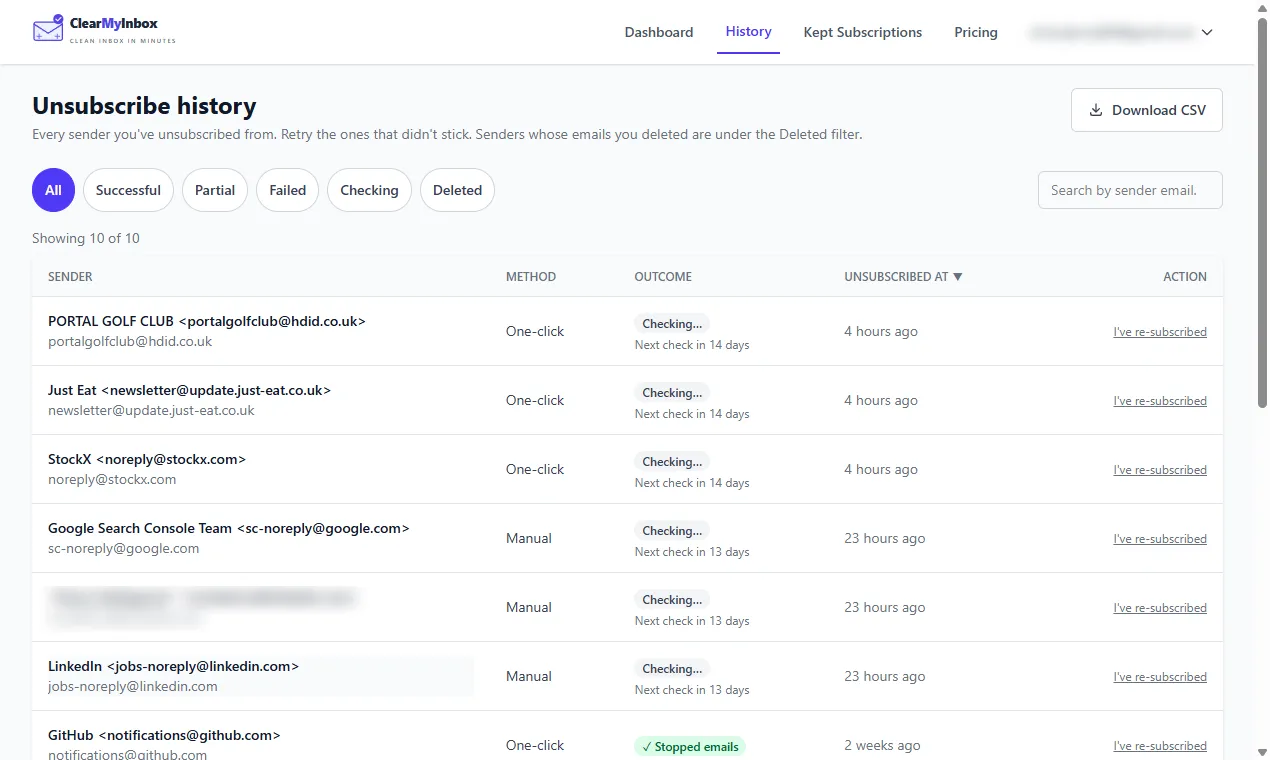
The differences run the other way on the two things this page is about. ClearMyInbox connects to a Gmail or Outlook mailbox through Google or Microsoft sign-in, with no app password and no IMAP switch, and you can disconnect it at any time. It finds every sender with an unsubscribe link, sends the unsubscribe request for the ones you pick, and then re-checks each sender over the following weeks and marks it Stopped emails or flags it as still sending, so you know whether the request was honoured rather than whether the mail was moved. It is funded by paid plans, not by your inbox: there is a free plan with ten automatic unsubscribes a month, and it never sells data. The trade-off is that you pay for the heavy use Unroll.me gives away.
Our verdict on Unroll.me
Our opinion, with the facts beside it: Unroll.me is a well-made free organiser whose price is your commercial email. If you like the Rollup format, you accept the NielsenIQ panel with your eyes open, and you turn the measurement switch off if you change your mind, it does what it says. If you searched "is unroll me safe" because you want the mail to stop and your receipts to stay yours, it is the wrong category of tool, not just the wrong tool, and our Unroll.me alternative page covers how to switch. For the wider field, including the other cleaner owned by the same company, see our Cleanfox review and the best email cleaner apps compared.