Cleanfox review: is it safe, and what does it cost?
This Cleanfox review comes down to one sentence from its FAQ: "we sell data for statistical research purposes related to e-commerce". That is why it is free, and why signing up joins NielsenIQ's consumer panel. It deletes newsletters rather than unsubscribing you. Whether that is safe depends on the trade you are willing to make; the facts follow.
Try ClearMyInbox free - bulk unsubscribe in one click, free to start.
What does Cleanfox do?
Cleanfox connects to a mailbox over IMAP, scans it, and shows you every newsletter and recurring sender with how many emails each has sent and how often you open them. Then you sort. Its FAQ describes three options: delete the old emails but keep the subscription, delete the old emails and "automatically delete your newsletters" from that sender in future, or keep everything. In the app you swipe: left to delete automatically, up to delete, right to keep. A list view lets you tick several senders at once. The FAQ is clear that nothing is removed for good: "Cleanfox never permanently deletes your emails. They are moved to your Trash folder", where your provider's own retention applies: the FAQ gives Gmail's 30 days as the example.
The word to notice is delete. The FAQ answers "Why do newsletters that I have deleted still appear in my inbox?" by explaining that unsubscribing often needs an email address and password, which "increases our margin of error", so "we have decided to opt for the automatic deletion of your unwanted newsletters". In other words Cleanfox does not send the sender an unsubscribe request; it catches each new email and moves it to the trash. The sender keeps you on its list and keeps sending, and the mail keeps arriving in a folder you do not look at. For a cluttered phone inbox that is a fast fix. It is not the same as being removed from a list, and the Terms say the same thing in legal language: a tool that "automatically deletes your newsletters".
How does Cleanfox read your mail, and what does it keep?
Cleanfox's Privacy Notice, effective 15 July 2025, is unusually direct. Under Commercial Information it says: "If you connect Cleanfox to one or more of your email inboxes, we will collect copies of and information from the commercial email messages you receive", listing transactional emails, purchase receipts, delivery confirmations, subscription confirmations and marketing emails. It explains the two reasons: to run the service, and to provide "Cleanfox's customers with market intelligence, analytics, datasets, and measurement products", which it calls being part of its "consumer panel". In its section for US users it says it may provide data about your commercial emails and some demographic characteristics "to customers such as e-commerce businesses, investment companies, consumer brands, media companies, and data brokers", and that directly identifying information is never sold to target you.
The retention line matters: copies of your commercial emails "are stored and processed until you either opt out of the panel, delete your account, or ask us to stop processing it". The Terms add that the extraction is done by filters on subjects and sender addresses so that personal correspondence is excluded, and that "a limited part of our teams may access your transactional emails" to improve those tools. The FAQ says the servers are in Germany, which is why your provider may warn you about an IMAP sign-in from an unfamiliar place.
The connection itself is an app password over IMAP. The FAQ walks Gmail users through enabling IMAP, turning on 2-Step Verification and generating an app password, and Microsoft users through two-step verification and an app password; the mobile app automates some of those steps. The Privacy Notice notes that Google's Limited Use restriction applies to Gmail users who sign in through Google's API, but "will not apply to other Gmail users that sign up for our Services by providing us with a Google App Password", which is the route the FAQ describes. There is a panel opt-out: in the app, My Settings, Your Mailboxes, your address, then "FoxIntelligence/NielsenIQ Panel", and on the website a privacy-rights form.
Is Cleanfox free, and what does it cost?
Free, with no paid tier at all. On 14 November 2026 the FAQ read "Yes. Cleanfox is 100% free. There are no subscriptions, no trial periods, and no hidden fees", the App Store listing was marked Free with no in-app purchases, and the Google Play listing said "100% free with no ads, no premium features, and no limits". The Terms explain the economics in one sentence: being free "depends on our ability to finance the service independently of any payment requested from users", so the business model is "the creation, from transactional data recovered from your email account, of data which we offer for sale for statistical purposes to economic operators". There is nothing to buy that would take you out of that arrangement; the opt-out above is the only lever.
Which mailboxes does Cleanfox support?
The Terms say only addresses "provided on a personal basis by ordinary email services (Gmail, Live, Hotmail, Outlook, iCloud, Orange, Yahoo, MSN, etc.)" are recognised, "excluding addresses that include professional domains", and the FAQ repeats that Cleanfox "does not process personalized email addresses" and is incompatible with some providers. The Google Play listing names Outlook, Yahoo Mail, Hotmail, AOL, iCloud, Exchange and IMAP accounts. So a personal Gmail, Outlook.com or iCloud address works; a work address on your company's domain does not, and the FAQ notes that the French provider Free has changed its terms to deny third-party companies access, so its mailboxes cannot be cleaned. It runs as iOS and Android apps and on the web, and the FAQ says it recommends the app for Gmail and Microsoft accounts. You must be 18 or older under the Terms.
What people ask about Cleanfox
Is Cleanfox safe?
Against an outside attacker, the usual protections are there: an app password you can revoke rather than your main password, two-step verification required, deletions that go to the trash rather than oblivion, and an undo under My Actions. The safety question people actually mean is about the data, and the answer is written in the Privacy Notice above: copies of your commercial emails are collected and kept while you are in the panel, and data about them goes to customers including data brokers. The FAQ's own line is that no data is shared "for advertising, profiling, or re-identification purposes". Both statements are true at once; which one weighs more is your call.
Is Cleanfox legit, and what are the complaints about?
Yes. It is published by NielsenIQ, a large market-research company, through its Foxintelligence subsidiary, which the FAQ says NielsenIQ bought in 2021. The App Store listing shows 27,000 ratings and the Play listing more than ten million downloads. People on Reddit report being surprised by the panel after the fact, which says more about how quickly people tap through consent screens than about the company hiding it: the consent copy on sign-up says, in the site's own words, "To keep Cleanfox free, we sell data for statistical purposes".
Does Cleanfox actually unsubscribe you?
Not in the sense of a request to the sender; the automatic deletion covered above is a filter on your side of the mailbox. The practical test is what happens when you leave: stop using Cleanfox and the senders you thought you had left are back in your inbox, because their lists never lost you.
How do I delete my Cleanfox account?
The FAQ's steps: sign in, open My Settings, then Your Mailboxes, select the address and click "Delete this mailbox". It says that deletes your Cleanfox account and all associated data, and the Privacy Notice says the same: "If you delete your account, we will delete all Personal Information we have about you." Two things to do afterwards: delete the app password you created for Cleanfox in your Google, Microsoft or Apple account, and expect the newsletters it was auto-deleting to reappear, because nobody ever asked them to stop.
Where ClearMyInbox differs, and where Cleanfox is better
Cleanfox does several things better than ClearMyInbox. It clears the backlog: it deletes a sender's old emails in bulk, by the thousand, which ClearMyInbox does not do. It is free with no cap on anything. It has polished iPhone and Android apps built around swiping, where ClearMyInbox runs in the browser. And it connects to iCloud, Yahoo and AOL mailboxes, while the ClearMyInbox guides on this site cover Gmail and Outlook.
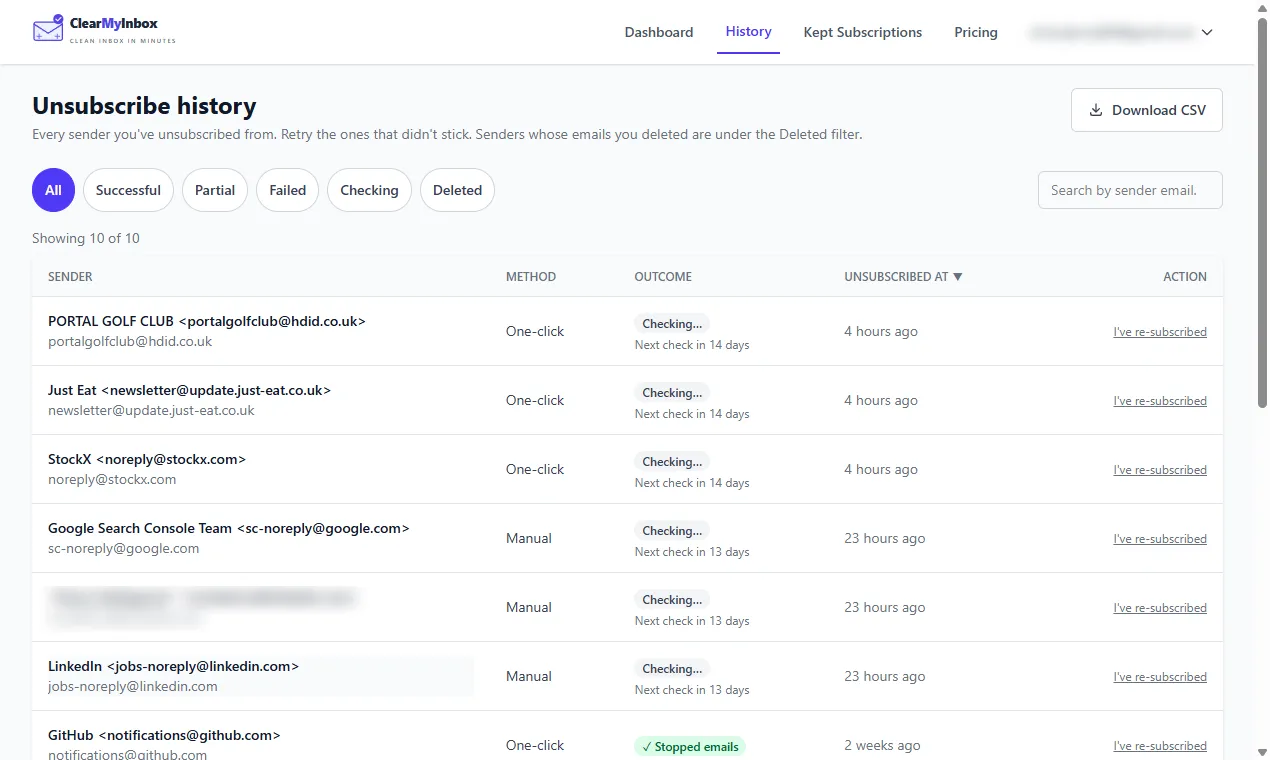
ClearMyInbox takes the opposite position on both of those trades. Where Cleanfox trashes each new email from a sender, ClearMyInbox asks the sender to stop: it lists every sender in your Gmail or Outlook mailbox that carries an unsubscribe link, sends the request for the ones you tick, and then keeps checking that sender's mail, marking it Stopped emails once nothing more arrives or flagging it if the sender carries on. The mail ends at the source, so it stays ended after you stop using the app. And where Cleanfox is paid for with your receipts, ClearMyInbox is paid for with money: the Free plan gives you ten automatic unsubscribes a month, Casual costs £29.99 a year, and it never sells data. You sign in with Google or Microsoft, with no app password and no IMAP setting, and can disconnect whenever you like. The cost of that model is literal: heavy use costs money that Cleanfox never charges.
Our verdict on Cleanfox
In our opinion Cleanfox is the best free way to empty a personal inbox from a phone, and the price is one you should read before paying it: copies of your commercial emails, kept while you are in the panel, with data about them sold to NielsenIQ's customers. The company says so itself in its FAQ, Terms and Privacy Notice, which is more than most free tools manage. If that trade suits you, swipe away and use the panel opt-out if you change your mind. If you would rather pay with money than with receipts, or you want the newsletters to actually stop, our Cleanfox alternative page covers the switch, our Unroll.me review covers the other cleaner the same company owns, and the best email cleaner apps compared sets all eight side by side.