Why am I getting emails from Daily Passport?
Daily Passport is a free travel newsletter published by Inbox Studio, Inc. of Chicago, one of about twenty newsletters the company runs on advertising. Addresses reach its list through its own sign-up box, through sister newsletters, and through partners and sweepstakes providers its privacy policy names. It is a legitimate newsletter operation with a working unsubscribe link.
Try ClearMyInbox free - bulk unsubscribe in one click, free to start.
Who runs Daily Passport?
The About page at dailypassport.com, read on 13 November 2026, describes the product as "an educational explorer's guide delivered every day to your inbox", with articles filed under Architecture, Culture, Geography, History, Outdoors and Tips. The stories on the front page that day were the kind the emails carry: five places in the US for an RV holiday, a Gibraltar runway with a road across it, why hotels cost more now. The site says "Daily Passport is free for all readers", and the Terms of Use, last updated 22 September 2025, are an agreement with "Inbox Studio, Inc. and its parent companies, subsidiaries, and affiliates".
Inbox Studio calls itself "An inbox-first media company" and lists Daily Passport beside Better Report, Nice News, Word Daily, The Discoverer, Inspiring Quotes, Interesting Facts, Crossword Club and a dozen more. Its privacy policy, last updated 19 September 2025, gives the company's address as 325 N. LaSalle St., Suite 200, Chicago, Illinois, and its homepage says the team has bases in Denver, New York and California. The business model is advertising: the company says it delivers traffic to brand partners through curated articles and "the ads we display across our network". That is why the newsletter is free, and why it wants a large list.
How did Daily Passport get my email address?
Three routes, all from the Inbox Studio privacy policy. First, the obvious one: you entered your address in the "The world is waiting" box on dailypassport.com, or clicked "Continue" on the gate that asks for an email before you can read an article. Second, a sister newsletter. The policy covers every Inbox Studio brand, so an address given to Interesting Facts or Nice News sits with the same company. Third, outside sources: the policy says the company may receive personal information "from third parties, such as our marketing and advertising partners", and goes on to name affiliate networks, data analytics partners and "sweepstakes providers". It adds that "a business partner may share your contact information with us if you have expressed interest" in something it offers.
The policy also says the company may "sell" or "share" identifiers, including email-related data, with affiliates, advertising partners and sweepstakes or joint-marketing partners, and that it works with LiveIntent "to facilitate email communications". If you entered a prize draw or ticked a partners box on another site, that is where the chain probably started; our guide to pre-checked opt-in boxes explains how those forms hand an address on. California residents can object to the selling through the "Your Privacy Choices" link in the site footer.
How do I unsubscribe from Daily Passport emails?
The sender documents one route. Its privacy policy says "You may opt out of marketing-related emails by following the opt-out or unsubscribe instructions" at the bottom of the email, or by contacting the company at privacy@inboxstudio.com. There is no account to sign into and no preference page on dailypassport.com, so:
- Open a Daily Passport email and scroll to the footer.
- Click the unsubscribe link. Gmail and Outlook also show their own Unsubscribe control at the top of the message for senders that support it; either works.
- If you also receive Word Daily, Interesting Facts or another Inbox Studio title, unsubscribe from each separately. One list does not clear the others.
The policy warns that you "may continue to receive service-related and other non-marketing emails" after opting out, which for a free newsletter with no account should be nothing. The route is the same on a phone as on a computer.
Is it safe to click the unsubscribe link in a Daily Passport email?
Yes, for a real one. Inbox Studio is a named company with a Chicago address and a policy that tells you to use the footer link, so the link in a genuine email does what it says. Check the sending domain and hover over the link before clicking, because a travel newsletter is an easy brand to imitate. If anything about the message looks off, run the link through our unsubscribe link safety checker before you touch it, and block the sender instead if it fails.
What if the emails keep coming?
Give it a few days. If Daily Passport is still arriving after a week, send a request to privacy@inboxstudio.com as the policy allows, then block the sending address in your mailbox so the problem stops being yours to watch. The block control sits in a different place in each mailbox, so there is a guide per provider: blocking a sender in Gmail, blocking a sender in Outlook, blocking a sender in Yahoo Mail and blocking a sender in the iPhone Mail app. Because the company sends many newsletters from the same infrastructure, a filter on the domain catches more than a block on one address.
What ClearMyInbox does with a sender like Daily Passport
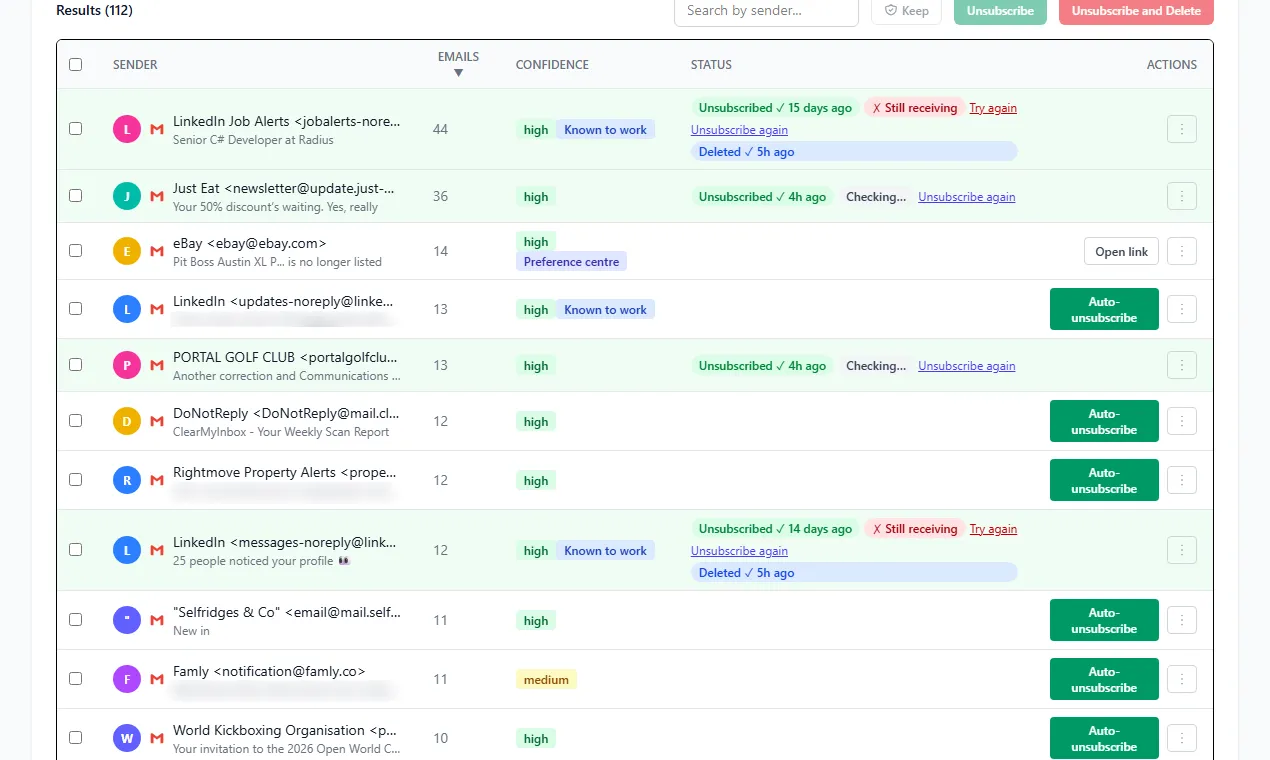
Newsletter publishers with twenty titles are the case bulk tools were built for. ClearMyInbox connects to a Gmail, Outlook, Yahoo or any IMAP mailbox, scans it for every sender with an unsubscribe link, and sends the requests for the ones you pick in one pass, so Daily Passport, Word Daily and Interesting Facts go together instead of one footer at a time. It then re-checks each sender and labels it Confirmed stopped or flags it as still emailing, which tells you which of the twenty, if any, needs blocking.
Frequently asked questions
Is Daily Passport legit?▾
Yes. It is a real travel newsletter from a named media company with a published address, terms and privacy policy. The content is light travel features, and the unsubscribe link in its emails is the route the company itself documents.
Is Daily Passport spam?▾
It is advertising-funded marketing email. If you never signed up, the explanation in the company's own policy is a sister newsletter, a partner or a sweepstakes provider passing your address on. That makes it unwanted mail with a working opt-out, not spam in the sense of a fraudulent sender.
Who owns Daily Passport?▾
Inbox Studio, Inc., according to the Terms of Use on dailypassport.com. The site's own pages do not name a parent company above Inbox Studio, so this page does not either.
Why am I also getting Word Daily, Nice News or Interesting Facts?▾
They are all Inbox Studio newsletters, and the company's policy covers all of them under one set of rules. An address collected by one brand can be marketed to by another. Each has its own list, so each needs its own unsubscribe.