How to stop the Olive Garden newsletter (eClub emails)
To stop the Olive Garden newsletter, use the unsubscribe link in any Olive Garden email, log into your account and update your preferences, or email privacy2@darden.com. Those are the three routes the Olive Garden privacy notice lists for promotional email. The emails come from the eClub you joined; leaving it entirely is a phone call to 1-888-467-4123.
Try ClearMyInbox free - bulk unsubscribe in one click, free to start.
Three ways out, in Olive Garden's words
Olive Garden's privacy notice (read on olivegarden.com on 14 November 2026; Darden, its parent company, publishes the same notice on darden.com) has a section called "Changes to Your Email Preferences": "If you wish to opt out from receiving future promotional email communications, you can:"
- "Use the unsubscribe link in the email you received from us;"
- "Log into your account and update your preferences; or"
- "Contact us at privacy2@darden.com."
The legal notices page says the same in different words: "You may opt-out of such commercial e-mails at any time, for example by clicking the 'Unsubscribe' link in the footer of our e-mail communications or by adjusting your e-mail preferences in your profile settings." So the account route is your profile's e-mail preferences after you log in; the notice does not name the menu, so look for the preferences section once you are in.
Unsubscribe from Olive Garden emails with the footer link
- Open any Olive Garden email.
- Scroll to the footer.
- Click Unsubscribe and finish on the page it opens.
Use it from each address Olive Garden writes to; no password is normally involved. A supported sender's message also gets Gmail's or Outlook's own Unsubscribe control at the top; see unsubscribing from emails on Gmail or unsubscribing from emails on Outlook for where it is and what it sends.
The eClub is the list
The newsletter has a name on Olive Garden's pages: the eClub. The FAQ points to it for everything promotional ("To be the first to find out about promotions, specials, and news sign up to our eClub!") and the privacy notice describes it in its disclosure on rewards: "The eClub is designed to keep you up to date on offers, promotions, and news relating to your favorite Darden brands. From time to time, we may offer free food or drinks, coupons, special offers, or other discounts to consumers who sign up for our eClub or other promotions." It also says "Participation in our eClub requires you to create an account", which is why the account route exists.
Unsubscribing from the emails and withdrawing from the eClub are described separately. The notice's "Right to Withdraw" is a phone call: "You may withdraw by calling us at 1-888-467-4123. If you would like to stop receiving our marketing communications, please see the instructions" in the email preferences section above.
What Olive Garden says continues
The privacy notice: "Please note that if you opt-out of our promotional emails, we may still send you email messages related to your account or any Services you request from us. Unsubscribing from our promotional emails will not affect the level or quality of service we provide to you." The legal notices give examples: "important notices and order confirmations". So a To Go order confirmation after your unsubscribe is exactly the mail Olive Garden says it keeps sending, which is why a block on the whole olivegarden.com domain is the wrong tool.
Stop Olive Garden texts
Texts are a separate opt-in with their own exit. The privacy notice's "Text Messaging Preferences" section: "You may choose to opt out from our text messages and alerts at any time. To directly opt out, reply to the last text message you received from us on your mobile phone with the word STOP, STOP ALL, END, QUIT, CANCEL or UNSUBSCRIBE, and we will unsubscribe you from applicable text communications." The email routes above do nothing to the texts, and STOP does nothing to the email.
Stop the Olive Garden newsletter on your phone
On a phone the three routes are the same three: the footer link in whatever mail app you use, the account preferences at olivegarden.com in a browser, or an email to privacy2@darden.com. The privacy notice covers Olive Garden's mobile applications as part of its Services, describing what they collect and how that is used, and tells you that precise location can be switched off in your device settings; it does not describe an email toggle inside the app, so use the website or the email for that.
Darden's other restaurants are separate sign-ups
The privacy notice lists an eClub sign-up for each Darden brand on its own website: Olive Garden, LongHorn Steakhouse, Cheddar's Scratch Kitchen, Yard House, The Capital Grille, The Capital Burger, Seasons 52, Bahama Breeze, Eddie V's and Ruth's Chris. If more than one of them is in your inbox, treat each brand's emails as its own list and use the link in that brand's email; the privacy2@darden.com route is the one the notice gives for all of them.
When Olive Garden emails keep coming
- Is it account mail? Order confirmations and other account messages are the emails the notice says continue.
- Has it been ten business days? That is the period US law allows for an opt-out to be honoured, and the notice sets none of its own; a special dated inside it is not a failed unsubscribe.
- Which address? The footer link changed the inbox it was mailed to. For another inbox, use a link from an email that reached it, or name that address in a note to privacy2@darden.com.
- Last, your own mailbox. Filter or block the promotional sender, never the whole olivegarden.com domain, with the provider's own steps in our guides to blocking an email address in Gmail, blocking emails on Outlook, blocking emails on Yahoo and blocking emails on iPhone.
What ClearMyInbox does with restaurant clubs
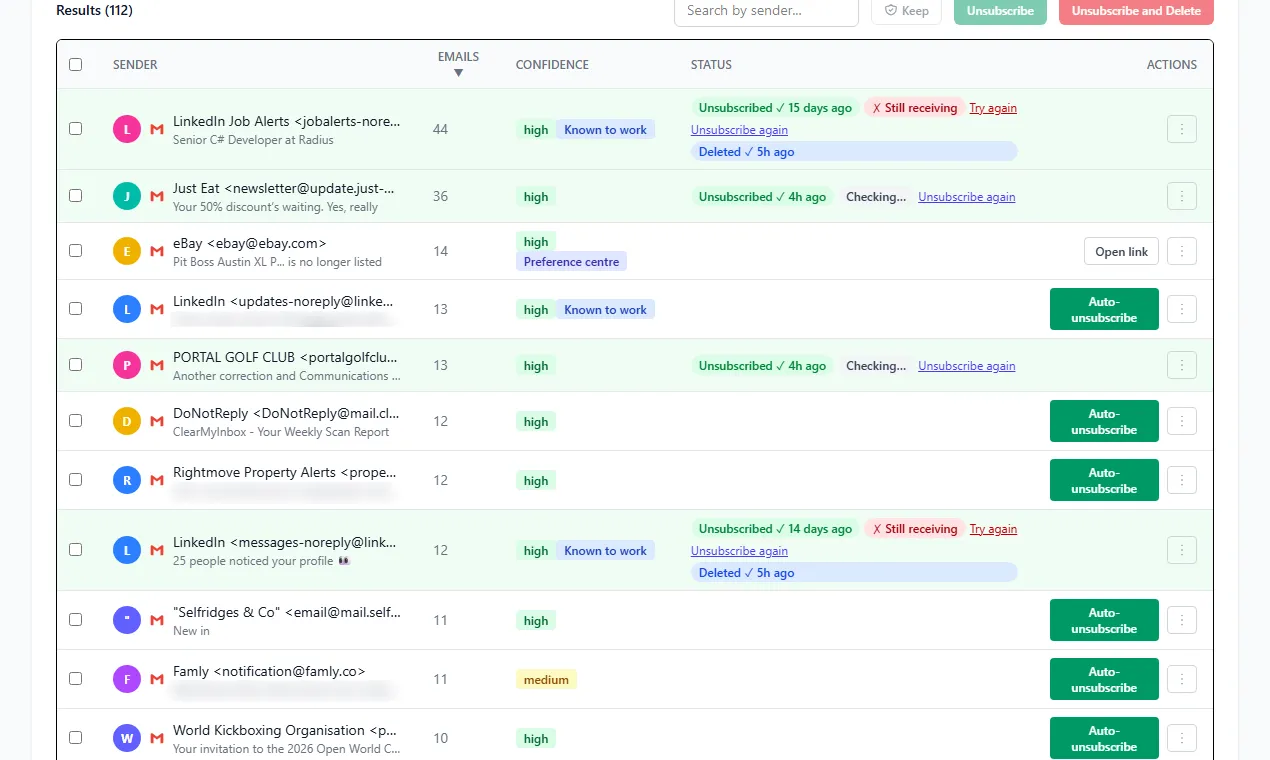
One eClub for a free appetiser becomes six when the family eats out. ClearMyInbox connects to your Gmail, Outlook, Yahoo or any IMAP mailbox, scans it for every sender with an unsubscribe link, and unsubscribes from the ones you pick in one go. It then re-checks each sender and labels it Confirmed stopped or flags it as still emailing, so a club that carried on is named in a table rather than announcing itself with next week's special. The Free plan includes 10 automatic unsubscribes a month, and manual ones are unlimited. Delivery apps work the same way; our guide to stopping food delivery emails covers them.
Frequently asked questions
Does Olive Garden have a rewards programme I would lose?▾
No. Olive Garden's FAQ answers the question directly: "We currently do not offer a rewards program, but you can sign up for our Eclub in order to receive news & offers." The eClub is the email list, so unsubscribing from it is the thing itself rather than a side effect on something else.
Will I lose the free birthday dessert if I unsubscribe?▾
Olive Garden's FAQ says guests "can receive a complimentary dessert on their birthday when they dine with us", and separately that "to receive other great offers, simply sign up for our eClub". The dessert is described for guests dining in; the eClub is described as the route to the other offers. Unsubscribe from the emails and you lose the emailed offers, on Olive Garden's own description.
How do I leave the Olive Garden eClub completely?▾
The privacy notice's "Right to Withdraw" line: "You have the right to withdraw from our eClub and other financial incentives at any time. You may withdraw by calling us at 1-888-467-4123." For the emails alone, the unsubscribe link, your account preferences or privacy2@darden.com are the documented routes.
How do I stop Olive Garden texts?▾
Reply to the last text with STOP. The privacy notice says: "reply to the last text message you received from us on your mobile phone with the word STOP, STOP ALL, END, QUIT, CANCEL or UNSUBSCRIBE, and we will unsubscribe you from applicable text communications." The email opt-out does not touch the texts.