How to stop the Vans newsletter and marketing emails
To stop the Vans newsletter, hit the Unsubscribe link at the foot of any Vans marketing email; Vans says you will be taken to a page to make it happen, and that page confirms "You are now unsubscribed from our emails." Vans Family members change their email and SMS preferences from their profile. Password reset and order emails continue.
Try ClearMyInbox free - bulk unsubscribe in one click, free to start.
The Unsubscribe link, in Vans' words
vans.com answers automated reads with "Access Denied", so we read the Wayback Machine's 9 December 2025 capture of the Vans US FAQ. Under Technology it asks "How do I unsubscribe from Vans marketing emails?" and answers: "If you need a break from our emails, just hit the 'Unsubscribe' link at the bottom of any Vans marketing email, and you'll be taken to a page to make it happen. If you have a Vans Family account, you can also modify your email preferences straight from your profile." The steps, then:
- Open any Vans marketing email.
- Scroll to the bottom and hit Unsubscribe.
- Complete the page that opens. Vans' unsubscribe page on cloud.e.vans.com, read live on 14 November 2026, ends with the line "You are now unsubscribed from our emails."
Click from the email itself; an address Vans mails separately needs its own click. Where Vans' email supports it, Gmail and Outlook show their own Unsubscribe control at the top of the message; our two guides, unsubscribing from emails on Gmail and then unsubscribing from emails on Outlook, show where it is and what it sends.
Change your email and SMS preferences in a Vans Family profile
The same FAQ's sign-up answer describes the second route: "If you're a Vans Family member or create an account, you can also manage your email and SMS preferences from your profile to customize the alerts you receive." And the Vans Family FAQ (Wayback Machine capture of 10 December 2025) answers "How do I stop getting emails from Vans Family?" with: "You may unsubscribe from emails at any time by updating your communication preferences", linking the words "communication preferences here" to the Vans Family page at vans.com/en-us/family. So:
- Sign in at vans.com.
- Open your profile, or the Vans Family page.
- Find the communication preferences and change the email and SMS settings.
Neither FAQ lists the options on that page, so read it when you get there. This is also the only text exit Vans documents on the pages we could read: the FAQ names "email and SMS preferences" in the profile and gives no STOP keyword, so this guide gives none.
What Vans says continues
Both FAQs draw the same line. The marketing FAQ: "Keep in mind, even if you unsubscribe, we'll still send you important emails like password reset and updates about your order." The Vans Family FAQ: "Even if you unsubscribe, you may still get an email from us if you need to reset your password (or there's another issue or problem affecting your program membership) or have recently placed an order and we need to share order updates with you." So a password reset, an order update or a membership notice after your unsubscribe is the list Vans said it would keep, and the reason not to block every vans.com address.
Vans Family emails and the newsletter are described separately
Vans Family is the loyalty programme: the Family FAQ describes 10 points for every $1 spent, a $5 reward for every 500 points redeemed, a 15% welcome offer, free standard shipping and member-only promotions, with an app on the App Store and Google Play. Its emails have their own FAQ entry and their own route (the communication preferences), while the marketing emails have the footer link. If you have both, work through both: the footer link in a marketing email, and the preferences in the profile for the Family mail.
Stop the Vans newsletter on your phone
Both routes work from a phone. The Unsubscribe link in a Vans marketing email opens the confirmation page in your browser from any mail app, and the profile's communication preferences load at vans.com in a phone browser. The Vans Family app is documented for points and rewards; the two FAQs place the email and SMS preferences in the website profile and say nothing about a toggle inside the app, so if its screens do not show one, use the website.
When Vans emails keep coming
- Name the stream. A password reset, an order update or a membership notice is the list Vans says continues; a Vans Family email after a footer unsubscribe is the second route, the communication preferences in your profile.
- Wait out the ten business days that US law allows a sender to honour an opt-out. Vans sets no period of its own, and a drop announcement dated inside those days proves nothing.
- Match the inbox. The link changed the address it was mailed to; a second inbox needs a link from one of its own emails, or its own profile.
- Then the mailbox. Block or filter the promotional address, not every vans.com sender, with the provider's own steps in our guides to blocking an email address in Gmail, blocking emails on Outlook, blocking emails on Yahoo and blocking emails on iPhone.
What ClearMyInbox does with Vans and the rest of your shops
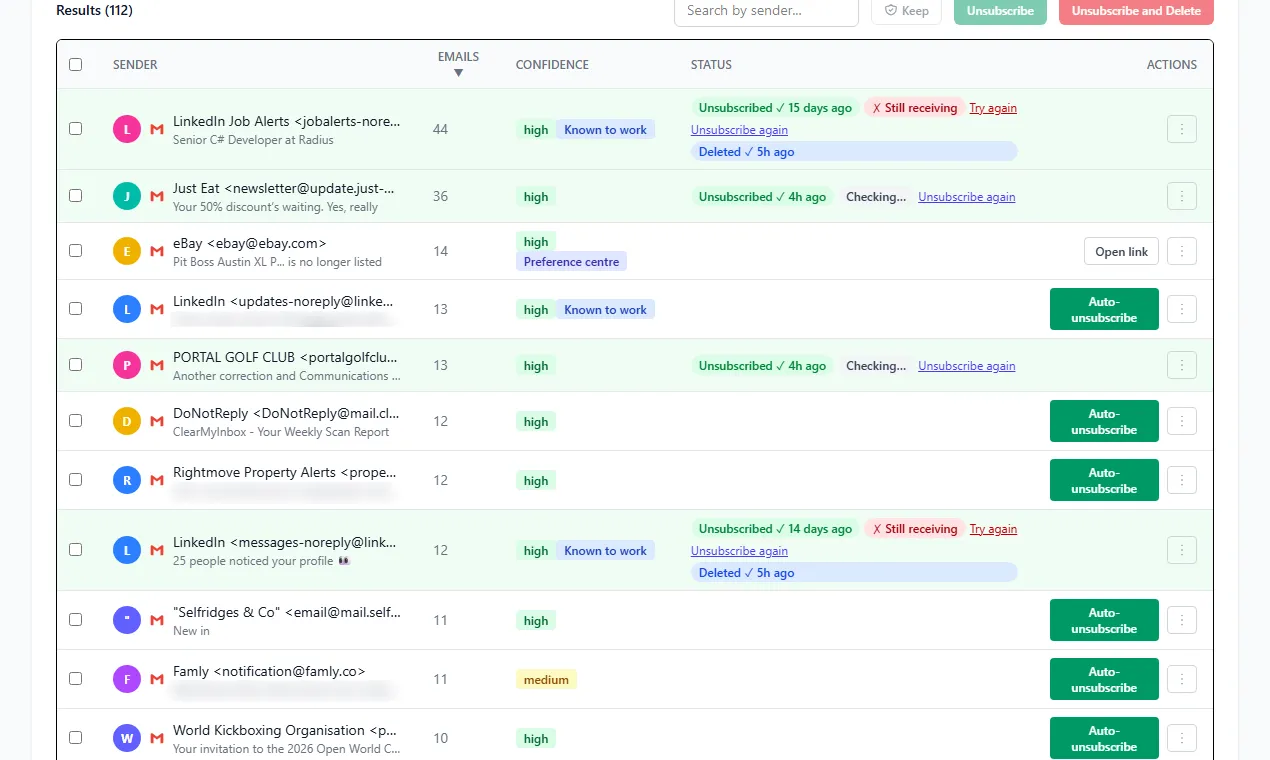
A shoe brand with a loyalty programme is two streams; a wardrobe's worth of brands is forty, which is what our guide to stopping shopping emails is for. ClearMyInbox connects to your Gmail, Outlook, Yahoo or any IMAP mailbox, scans it for every sender with an unsubscribe link, and unsubscribes from the ones you pick in one go. It then re-checks each sender and labels it Confirmed stopped or flags it as still emailing, so the brand that kept writing is a flag you can act on rather than another drop announcement. The Free plan includes 10 automatic unsubscribes a month, and manual ones are unlimited.
Frequently asked questions
Does unsubscribing from Vans emails cancel my Vans Family membership?▾
The Vans Family FAQ describes unsubscribing as "updating your communication preferences", and says that even after you unsubscribe you may still get an email about "an issue or problem affecting your program membership". It describes the opt-out as a change to what Vans sends, not to the membership, so expect your points and rewards to stay. Cancelling the membership itself is covered by the Loyalty Program Terms and Conditions the FAQ links.
Can I stop the Vans newsletter but keep Vans Family emails?▾
Vans documents two places: the Unsubscribe link in a marketing email, and the communication preferences in a Vans Family profile. The FAQ says a Family member "can also modify your email preferences straight from your profile", which is where any per-stream choice would be; the pages we could read do not list the options, so read the profile page when you get there.
Why am I still getting Vans emails after unsubscribing?▾
Check which page you used and which address the new email went to. Vans describes the marketing emails (footer Unsubscribe link, or the profile) and the Vans Family emails (communication preferences in the profile) separately, and both work per address. Password reset and order update emails continue by design. After ten business days, block or filter the promotional address at your mailbox.
How do I contact Vans Customer Care about emails?▾
The FAQ gives three routes: a 24/7 chat through the Chat button on any page, which "can transfer you to a live agent during operating hours"; the contact page for email; and a customer service text number, (855) 909-8267. Operating hours are Monday to Friday 6:00 a.m. to 4:00 p.m. PST and Saturday and Sunday 6:30 a.m. to 3:00 p.m. PST.