How to stop ActBlue emails
To stop ActBlue emails, first work out who sent them. ActBlue itself sends donation receipts and, as a nonprofit, an occasional appeal of its own, with an unsubscribe link at the bottom. The fundraising emails that mention ActBlue come from the campaigns you gave to, and each needs its own unsubscribe, through the link at the end of its email.
Try ClearMyInbox free - bulk unsubscribe in one click, free to start.
Three senders hide behind ActBlue in your inbox
ActBlue is the payment platform Democratic campaigns, progressive organisations and some nonprofits use to take donations. Its help centre is blunt about what it does and does not send:
- Receipts. ActBlue emails receipts for contributions from info@actblue.com; its help article on missing receipts says they may have landed in spam and asks you to add that address to your contacts.
- ActBlue's own list. The article "How do I unsubscribe from your email list?" confirms ActBlue runs one, and another article says that "because we are a nonprofit, you may receive a fundraising email from us every now and then".
- The campaign's emails. ActBlue says it does "not send emails or texts on behalf of any other groups", and shares your address only with the campaign or organisation you donated to. The appeals that arrive after you give come from that group, even when the donate button inside points back to actblue.com.
Unsubscribe from ActBlue's own emails
ActBlue's instruction is one line: click the unsubscribe link at the bottom of an email from ActBlue. The same article adds that this list "is separate from ActBlue security notifications", which are the alerts about activity on your ActBlue Express account. Those are controlled in the account rather than the email: ActBlue's account settings article describes a Settings page with a Notifications tab for the emails your account sends automatically, and a Security tab for the address, password and two-factor settings. The same article says that even with every notification toggled off "you will still receive security notifications for critical events including password changes and updates to two-factor authentication", so those cannot be switched off.
Stop the campaign emails that mention ActBlue
This is where most of the volume comes from, and ActBlue cannot stop it for you because it did not send it. Its help centre gives the same three steps on several pages:
- Go to the bottom of the campaign's email and click its Unsubscribe link. ActBlue notes that most groups' emails carry one.
- For texts, reply STOP to the message. Giving a phone number when donating is optional, and ActBlue passes it only to the group you gave to.
- Contact the campaign directly if the emails continue. ActBlue says campaigns typically list contact details on their own websites, and that hearing from supporters shapes what they send.
Each campaign is a separate list, so a donor to six campaigns has six unsubscribes to make. The link in one campaign's email does nothing to the other five.
Report a campaign that ignores your unsubscribe
ActBlue publishes a route for groups that keep writing after you have opted out, in "How can I report unwanted communications from campaigns or organizations?". After you have unsubscribed and contacted the group, email info@actblue.com with the subject line Reporting Possible Violation and include:
- the name of the campaign or organisation that kept sending;
- a screenshot or copy of the email or text you received;
- a description of what happened and why you think the group should be reviewed.
ActBlue says it needs those three things "to complete a thorough review". The article does not say what follows the review, and ActBlue cannot unsubscribe you from a list it does not send to, so make the report after the unsubscribe, not instead of it.
Receipts and recurring donation emails: what to keep
Receipts are the emails worth keeping, for your records and for anything you claim later. They go to the address you typed when you donated, and ActBlue's help centre draws a line: for a recurring contribution, the receipts always go to the email used for the first donation and cannot be redirected. For future one-time donations, an ActBlue Express account lets you change the Contact email address under Contact Info, which is a different setting from the sign-in address. If receipts are missing, check spam and add info@actblue.com to your address book, as the help article suggests.
Unsubscribing from a campaign's emails does not touch your recurring donation to it. The help centre says you can update or cancel recurring donations at any time from your account, so if the appeals made you want to stop giving as well, that is a separate step in the ActBlue Express account, not the footer link.
When the appeals keep coming
- New senders. ActBlue says it does not sell your contact information. Campaigns, though, often share or rent their lists with allied committees, so a donation to one race can bring appeals from several. Each new sender is a new unsubscribe; our guide to unsubscribing from political emails covers the pattern.
- The wrong link. Unsubscribing from ActBlue's own list does not stop any campaign, and unsubscribing from one campaign does not stop ActBlue's receipts.
- Then block the campaign, not ActBlue. If a group keeps writing after the ten business days US law allows for an opt-out, block or filter its sending address at your mailbox with our guides for Gmail, Outlook, Yahoo Mail and the iPhone Mail app. Leave info@actblue.com unblocked, or your receipts go to Spam with the appeals.
What ClearMyInbox does with political mail
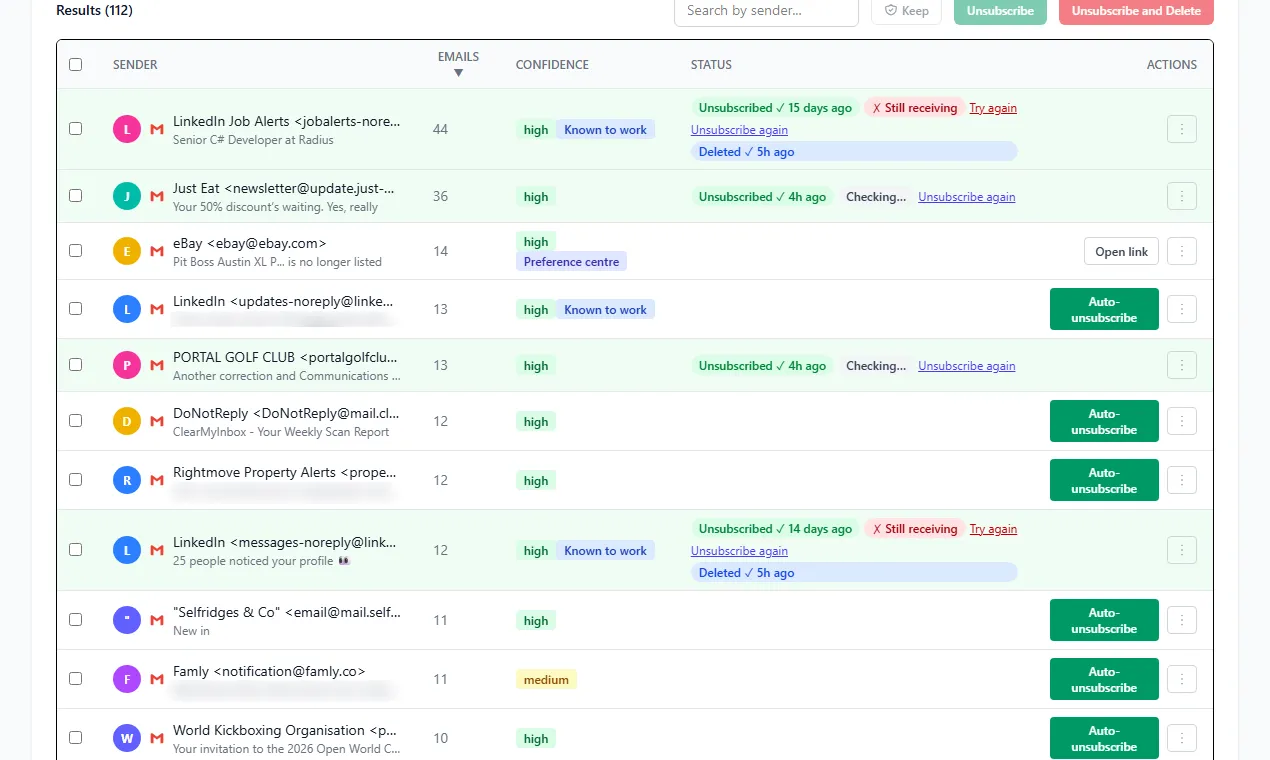
Each campaign is its own list, so the check after each click matters as much as the click. ClearMyInbox connects to your Gmail, Outlook, Yahoo or any IMAP mailbox, scans it for every sender with an unsubscribe link, and unsubscribes from the ones you pick in one go. It then re-checks each sender and labels it Confirmed stopped or flags it as still emailing, so the committee that ignored you is named in a table, with the evidence you need for ActBlue's report. The Free plan includes 10 automatic unsubscribes a month, and manual ones are unlimited.
Frequently asked questions
Is ActBlue spam?▾
No. ActBlue is the processor that took your donation, and its own email is the receipt plus an occasional appeal of its own with an unsubscribe link. The volume you are reacting to comes from the campaign you gave to and from the groups it shares with. Treat the receipt as a record and the appeals as the thing to unsubscribe from.
Does unsubscribing from a campaign cancel my recurring donation?▾
No. The two are unconnected. The footer link changes the campaign's email list; the recurring donation lives in your ActBlue Express account, where ActBlue says you can update or cancel it at any time. Do both if you want both.
How do I stop ActBlue texts?▾
Reply STOP to the text. ActBlue says the texts come from the group you gave to, not from ActBlue, and that STOP is the way out. If the texts continue, the same reporting route applies, with a screenshot of the text.
How do I delete my ActBlue account?▾
ActBlue's account settings article says the option to permanently delete your personal account sits at the bottom of the Security tab in Settings. Deleting the account does not unsubscribe you from any campaign's list, because those lists belong to the campaigns; do the footer links first. Charity appeals that followed a donation elsewhere have the same shape, covered in our guide to stopping charity donation emails.