Why am I getting emails from Jobs2Careers?
Is Jobs2Careers legit? Yes: Jobs2Careers is a free job search engine run by Talroo, Inc. of Austin, Texas, the company that used to carry the Jobs2Careers name itself. Its emails are job alerts, triggered when you search, upload a resume or apply through the site. It is a legitimate operation with its own unsubscribe page, and no scam.
Try ClearMyInbox free - bulk unsubscribe in one click, free to start.
Who runs Jobs2Careers?
The site, jobs2careers.com, read on 13 November 2026, calls itself "a free job search engine" and carries the logo "Jobs2Careers Powered by Talroo". Its About, Privacy and Terms links all lead to talroo.com, and the Terms of Use settle the relationship: they are issued by "Talroo, Inc. (“Talroo”)", described as "f/k/a Jobs2Careers, InsidersReferral.com, Inc.", at 9600 N. Mopac Expy Bldg 2 Ste 625, Austin, TX 78759, under Texas law. Talroo's About page describes the parent as "a data-driven job advertising platform that reaches the candidates you need to build your essential workforce": employers pay Talroo to put their vacancies in front of job seekers, and Jobs2Careers is where the job seekers are.
The site itself offers job search by title and location, a free resume builder, a Chrome extension called Jobs2Careers+, career advice, and "job notifications based on your activity". The Terms are candid about where the jobs come from: "To access a job posting, job seekers are redirected by Talroo to the website of the company that posted the job", and "We do not own the job postings". That matters for the alerts, because the email is Talroo's but the job, and anything you apply to, belongs to someone else.
How did Jobs2Careers get my email address?
The Terms contain the consent most people on the list gave without noticing. Creating or uploading a resume means "you agree that Talroo or its recruitment channel partners may contact you via the email or phone provided to share job listings that fit with your experience". So a resume uploaded during one search session becomes an open invitation for job alerts, and not only from Talroo: "recruitment channel partners" are the sites and recruiters Talroo distributes to. The privacy policy, last modified 1 July 2026, lists the direct routes (forms on the site, correspondence, a social sign-in that shares "name and email address") and says information may also come "From third parties, for example, our business partners".
The policy does not describe co-registration, sweepstakes or list buying, so this page does not claim them. It does say Talroo "does not sell your personal information", though it discloses data to Google and Meta for ad measurement, which some state laws count as sharing, with its own opt-out tool for that. If you cannot remember creating a Jobs2Careers profile, the likeliest cause is an application made through a partner job board that uses Talroo's listings: the Terms' partner clause covers exactly that case. Our guide to pre-checked opt-in boxes shows how application forms often carry that consent.
How do I unsubscribe from Jobs2Careers emails?
This sender is better than most: it has a self-service unsubscribe page and says so. The contact page reads "You can unsubscribe yourself, without waiting on a reply from us", and links an "Unsubscribe this email address" page and a "Manage your job alerts" page where you can "change or remove them whenever you like". The unsubscribe page is headed "Unsubscribe from Jobs2Careers" and says "Enter your email to stop receiving our emails and job alerts":
- Go to jobs2careers.com/unsubscribe, enter the address the alerts arrive at, and submit. This stops both job alerts and other emails from the site.
- To keep some alerts and drop others, sign in instead and open Manage your job alerts in your settings, where each saved search can be edited or removed.
- To go further and remove your profile and resume, the contact page says to "Verify your identity in the privacy portal and request deletion there", at privacy.talroo.com.
The footer link in any alert email does the same as step 1. For text alerts, the privacy policy says to text STOP. The route is identical on a phone, though the settings page is easier on a larger screen. For promotional email that is not a job alert, the policy also offers "emailing us at privacy@talroo.com".
Is it safe to click the unsubscribe link in a Jobs2Careers email?
In a genuine alert, yes, and you do not have to rely on the link: the site's own unsubscribe page does the same job without opening the email. The thing to check is whether the email is really from Jobs2Careers. Fake job alerts are a well-worn phishing route for people who are actively applying and expect mail from strangers, so look at the sending domain and where the links point. A real alert's links lead to jobs2careers.com, and from there to the employer. If a link goes elsewhere, test it with our unsubscribe link safety checker, and use the site's unsubscribe page instead.
What if the alerts keep coming?
Two causes are common. The first is a second address or a second profile: alerts go to every address that ever uploaded a resume, so check an old personal address if you only unsubscribed the current one. The second is the partner clause: a "recruitment channel partner" contacting you is not Jobs2Careers, and unsubscribing from Talroo does not reach it, so unsubscribe from that sender separately. If Jobs2Careers mail itself continues after the self-service page, block the sender in whichever mailbox the alerts reach, with our Gmail blocking guide, the Outlook one, the Yahoo Mail one or the iPhone Mail one. For the whole category of recruiter and job-alert mail, our guide to stopping recruiter emails covers Indeed, LinkedIn and the rest.
What ClearMyInbox does with a sender like Jobs2Careers
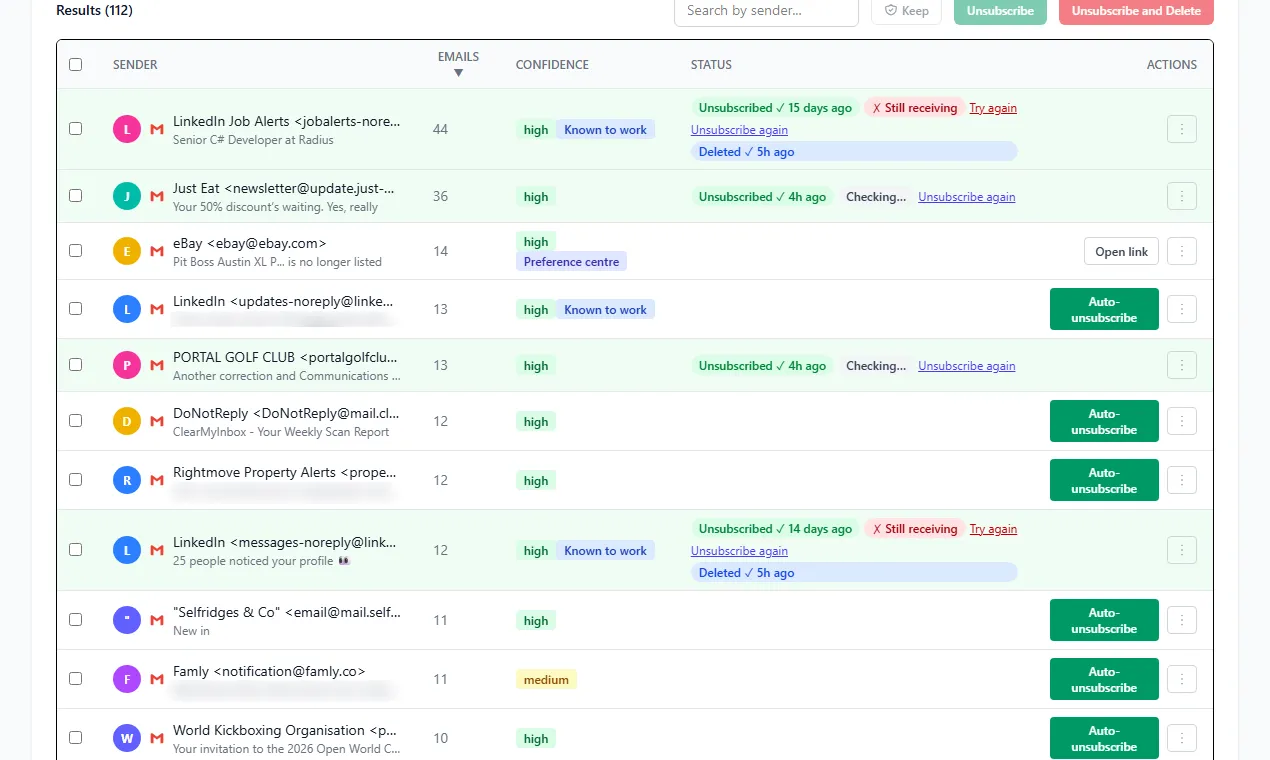
A job hunt leaves a mailbox full of alert senders long after the job is found. ClearMyInbox connects to your Gmail, Outlook, Yahoo or any IMAP mailbox, lists every sender with an unsubscribe link, and sends the requests for the ones you tick in one pass, so Jobs2Careers and the partner boards go together. It then re-checks each sender and labels it Confirmed stopped or flags it as still emailing, so the one board that ignored the request is the one you block.
Frequently asked questions
Is Jobs2Careers a scam?▾
No. It is a job aggregator owned by Talroo, Inc., a named Texas company with a street address, a privacy policy and a working self-service unsubscribe. What it does not do is vet the listings: its Terms say it does not own the postings and does not guarantee their authenticity, so apply the same care to a job found there as to one found anywhere else.
Is Jobs2Careers spam?▾
Its alerts are triggered by your own activity, under a consent in the Terms that most people never read. That makes them unwanted rather than unsolicited, and the sender gives you a page to stop them. People on Reddit report alerts for jobs they never searched for, which usually traces back to a resume uploaded on a partner site.
What is Jobs2Careers, and is it the same as Talroo?▾
Jobs2Careers is the job search site; Talroo, Inc. is the company that runs it and sells job advertising to employers. The Terms record that Talroo was formerly known as Jobs2Careers, so older mentions of "Jobs2Careers the company" refer to the same business.
How do I delete my Jobs2Careers account?▾
Through Talroo's privacy portal at privacy.talroo.com, where the contact page says you verify your identity and request deletion. Unsubscribing stops the email; deletion removes the profile and resume behind it.