How to stop Bath & Body Works emails
To stop Bath and Body Works emails, open any of them, click the link at the bottom, then either pick a lower frequency and submit, or choose Unsubscribe to stop them completely. Bath & Body Works documents no email switch in your account: the footer link is the route, and paper coupons and texts each have a separate exit.
Try ClearMyInbox free - bulk unsubscribe in one click, free to start.
Get fewer Bath & Body Works emails instead of none
Most retailers offer unsubscribe or nothing. Bath & Body Works is one of the few whose help centre documents a middle setting, in the article "How do I change my email frequency or unsubscribe from offers?" (updated June 2025). The steps it gives:
- Open a recent Bath & Body Works email and click the link at the bottom.
- On the page that opens, pick how often you want to hear from the brand from the dropdown menu.
- Click Submit.
That keeps you on the list for Candle Day and the semi-annual sale without the daily drip. The article does not list the frequency options by name, so read the dropdown when you get there rather than expecting a particular label.
Unsubscribe from Bath & Body Works emails completely
Same link, different button. The help article's second instruction is: "Stop emails completely by choosing the Unsubscribe button." So the order is open an email, scroll to the bottom, click the link, and on the preferences page press Unsubscribe rather than Submit. The link is tied to the address the email was sent to, which means no login and no account, but also that a second address needs its own click.
If you would rather not open the email at all, Gmail and Outlook show their own unsubscribe control at the top of a message from a sender that supports it. Our guides to unsubscribing from emails on Gmail and on Outlook show where that control is and what it does.
Is there an email setting in my Bath & Body Works account?
Not one the brand documents. The Email, Mail, & Texts section of the Bath & Body Works help centre holds seven articles: joining the mailing list, missing coupons, updating a mailing address, leaving the mailing list, signing up for email offers, changing email frequency, and the text programme. Every email instruction in them points at the link in the footer of an email, not at a page in My Bath & Body Works Rewards or the app. Signing up is handled the same way: the "How do I sign up to receive email offers?" article sends you to the email box at the bottom of the home page.
So if you are hunting through the app's account screens for an email toggle, stop: the documented control is in the email itself, on any device. Open the email on your phone, tap the footer link, and the same frequency and Unsubscribe choices appear.
Stop the paper mailers and coupons too
The emails and the printed coupons are two different lists, and unsubscribing from one leaves the other running. For the post, Bath & Body Works' article "How do I unsubscribe from your mailing list?" (updated June 2025) gives a form rather than a link:
- Open the Mailing Address Request form on the help centre.
- Select Mailing Address Request from the Topic dropdown.
- Choose Delete as the Request Type and fill in the address details.
The article says your details are removed "right away", but that printed mailers can take 60 to 90 days to stop because they are produced in advance, and it asks you not to use any mailed coupons in the meantime, because redeeming one can delay the removal.
Stop Bath & Body Works texts
Texts are a third list. The text programme article says: reply STOP to any of the messages, or text STOP to 34799. Email preferences do not touch the text programme and the text keyword does not touch email, so a full opt-out is three actions: the footer link, the STOP text and, if you get coupons in the post, the form.
When Bath & Body Works emails keep coming
Check which address the new email went to. Because the footer link works per address, a household that shops under two emails, or a rewards account registered to an older address, keeps one stream alive after the other stops. Open an email in the second mailbox and repeat the footer step there. Allow a short gap after the click as well: US law gives a sender up to ten business days to honour an opt-out, and mail already queued will land.
If an unsubscribed address is still getting offers after that, block or filter the sender at your mailbox. We have the provider's own steps for Gmail, Outlook, Yahoo Mail and the iPhone Mail app. Block the exact promotional address rather than the whole domain, so an order confirmation from a different Bath & Body Works address still reaches you.
What ClearMyInbox does with Bath & Body Works and the rest
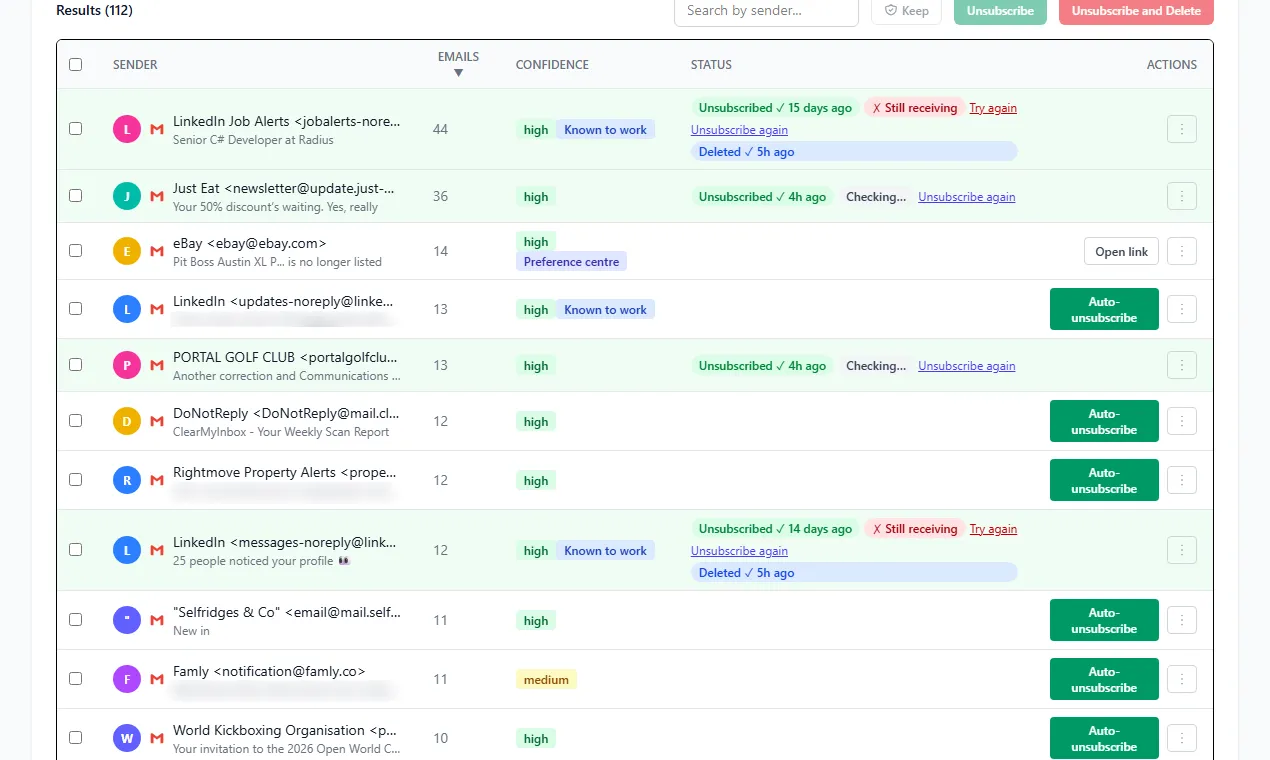
Bath & Body Works is usually one of a dozen shops writing to the same inbox. ClearMyInbox connects to your Gmail, Outlook, Yahoo or any IMAP mailbox, scans it for every sender with an unsubscribe link, and unsubscribes from the ones you pick in one go. It then re-checks each sender and labels it Confirmed stopped or flags it as still emailing, so you find out whether the footer click worked without waiting for the next sale announcement. The Free plan includes 10 automatic unsubscribes a month, and manual ones are unlimited.
Frequently asked questions
Will unsubscribing stop my order confirmation and shipping emails?▾
The help article is about offers: it is titled "change my email frequency or unsubscribe from offers", and the frequency option exists so you can keep some promotional mail. Bath & Body Works does not say in its help centre what happens to order emails after an unsubscribe. In practice an order confirmation is sent because you placed an order, not because you are on the offers list, so expect it to arrive; if you want certainty, check the order status in your account rather than relying on the email.
Why did my Bath & Body Works emails stop on their own?▾
Usually a mail filter rather than the brand. Look in Spam or Promotions first and mark a message Not spam if it is there. The brand's missing-coupons article covers the paper side; for email, re-enter your address in the box at the bottom of the home page, which is the sign-up route the help centre gives.
Does the email unsubscribe affect My Bath & Body Works Rewards?▾
Nothing in the email frequency article ties the two together. The rewards programme has its own FAQ section in the help centre, and the email instructions never mention it, so treat your points and your inbox as separate. If a rewards notice stops arriving after you unsubscribe, the frequency option is the way to get some mail back without the full stream.
Is there a faster way than opening each email?▾
For one brand, no: the footer link is the documented route and it takes a minute. For the whole category, yes. Our guide to stopping shopping emails covers the pattern every retailer follows, and a bulk tool does the clicking for all of them at once.