How to stop Hollister emails
To stop Hollister emails, open one, scroll to the bottom and click Unsubscribe, then repeat in any other mailbox Hollister writes to. That is the only route Hollister documents: its US help centre has no email article, and the only email choice we found documented on hollisterco.com is the subscription prompt when you join.
Try ClearMyInbox free - bulk unsubscribe in one click, free to start.
Where the Hollister unsubscribe link is, and what it does
Scroll past the outfits and the store finder to the legal lines at the very end of the email. The Unsubscribe link sits there, next to the privacy and terms links. It opts out the address the email was sent to, which is why it works without a password and why it does nothing for a second address. Click it, confirm on the page that opens, and allow up to ten business days, the period US law gives a sender to act on an opt-out.
You do not have to open the email at all if your mailbox does the work: Gmail and Outlook put an Unsubscribe control in the message header for senders that support it. Our guides to unsubscribing from emails on Gmail and on Outlook explain what that button sends and when it is missing.
Does Hollister have an email settings page?
Not one it documents. The live US help page redirects visitors outside the US to their regional store, so we read the Wayback Machine's 9 September 2026 capture of hollisterco.com/shop/us/help. It opens with "Hi, How Can We Help?" and five quick links (Track My Order, Start My Return, Track My Return, Look Up My Order, Check Gift Card Balance), with Chat With Us and Phone Numbers beside them. The footer's Help column lists Customer Help, About Hollister House Rewards, Order Help, Shipping & Handling, Online Returns, Track My Order, Cards & E-Cards, Student Discount, Gift Cards and Find a Store. None is an email topic.
The footer's Subscribe box (Email Address, Join) opens a prompt titled "Choose your Hollister email subscriptions.", which is the one place the site lets you pick what Hollister sends, and it is for joining the list. The legal links are Privacy / Ad Cookies and Hollister House Rewards Terms; the privacy notice loads behind a bot check that stopped us reading it, so if it describes a preference route, we could not confirm it. On what Hollister publishes, the documented way to change your mind after joining is the footer link in the emails.
Hollister House Rewards emails
Hollister's loyalty programme is Hollister House Rewards. Its About page (the 9 September 2026 capture) describes a $10 welcome offer on a $40 purchase, member discounts and double points in your birthday month, first access to select new arrivals, 100 points per dollar with 12,500 points making a $5 reward, and a Gold status at $300 a year with free shipping and an annual gift. It says nothing about email, so Hollister documents no separate switch for rewards mail. If a House Rewards email arrives after you have unsubscribed from the promotions, open it and use its own footer link: that link is tied to the list that sent it.
Stop Hollister emails on your phone
Hollister documents no email toggle in its app, so the phone route is the email itself. Open the latest Hollister email in the Gmail, Outlook or Mail app, scroll to the end and tap Unsubscribe. Push notifications from the Hollister app are controlled in your phone's notification settings for the app, not by the email opt-out.
Hollister and Abercrombie are one company, two lists
Hollister is one of Abercrombie & Fitch Co.'s brands: the corporate site lists Abercrombie & Fitch, abercrombie kids and Hollister, and the help page's Our Brands footer shows the same three. They do not share an unsubscribe: an opt-out from Hollister leaves Abercrombie writing, and the other way round. If both brands are in your inbox, work through both. Our Abercrombie emails guide has the same honest answer for the sister brand.
When Hollister emails keep coming
- Inside ten business days: normal. Mail already scheduled still lands.
- To a different address: a second list. Click the footer link in an email sent to that address.
- From Hollister House Rewards: use that email's own footer link, as above.
- After all that: block or filter the exact promotional address at your mailbox. The provider's own steps are in our guides to blocking an email address in Gmail, blocking emails on Outlook, blocking emails on Yahoo and blocking emails on iPhone. Keep order confirmations reachable by blocking the marketing address, not every hollisterco.com sender.
What ClearMyInbox does with Hollister and the rest
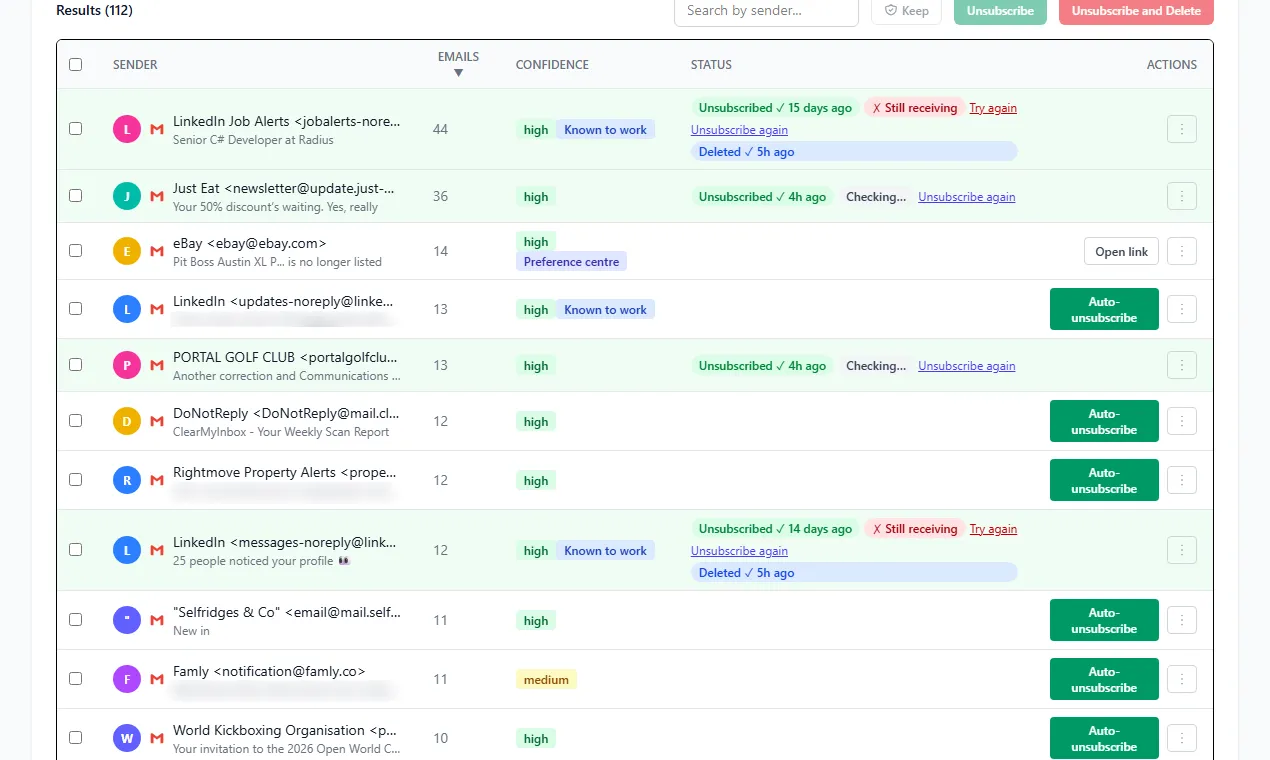
A teenager's inbox, or a parent's, usually has Hollister next to a dozen other shops, each with the same footer link in a different place. ClearMyInbox connects to your Gmail, Outlook, Yahoo or any IMAP mailbox, scans it for every sender with an unsubscribe link, and unsubscribes from the ones you pick in one go. It then re-checks each sender and labels it Confirmed stopped or flags it as still emailing, so a Hollister list that kept going is a flag in a table rather than a surprise next week. The Free plan includes 10 automatic unsubscribes a month, and manual ones are unlimited.
Frequently asked questions
How did Hollister get my email address?▾
Hollister's documented sign-up is the Subscribe box in the site footer: it asks for an email address and opens the "Choose your Hollister email subscriptions." prompt. Whether an address given at checkout, on an emailed store receipt or when joining House Rewards is also used for marketing is not something Hollister's pages state. A shared family address collects everyone's sign-ups, which is why one teenager's sign-up can fill a parent's inbox.
Will unsubscribing stop my Hollister order confirmations?▾
Order confirmations, shipping updates and return labels are sent because of an order, not because you are on the marketing list, so expect them to continue. Hollister does not document them as a separate category, which is the reason to unsubscribe and filter rather than block the whole domain: a domain block would send the return label to Spam too.
Can I choose which Hollister emails I get?▾
When you join, through the "Choose your Hollister email subscriptions." prompt the footer Subscribe box opens. After that, Hollister documents no preference page and no frequency option, so the documented choice is on or off per address. For fewer emails without leaving the list, a mailbox filter that archives the promotional address is the nearest thing.
I used the Unsubscribe button in Gmail. Did that count?▾
Yes, when the button was there. Gmail and Outlook show it only for senders whose emails carry the unsubscribe header, and pressing it sends Hollister the same request as the footer link, for the same single address. If the button is missing on a particular email, that message did not carry the header; open it and use the footer link instead. Either way the ten-business-day allowance applies before you can call it ignored.
How do I contact Hollister about emails that will not stop?▾
The US help page offers Chat With Us and Phone Numbers under "Hi, How Can We Help?". Give the exact address the emails arrive at and the date of the unsubscribe you already made. For the wider habit of leaving retail lists in bulk, see our guide to stopping shopping emails.